
100 Day Baby Photo Template Ideas for Meaningful Keepsake Photos
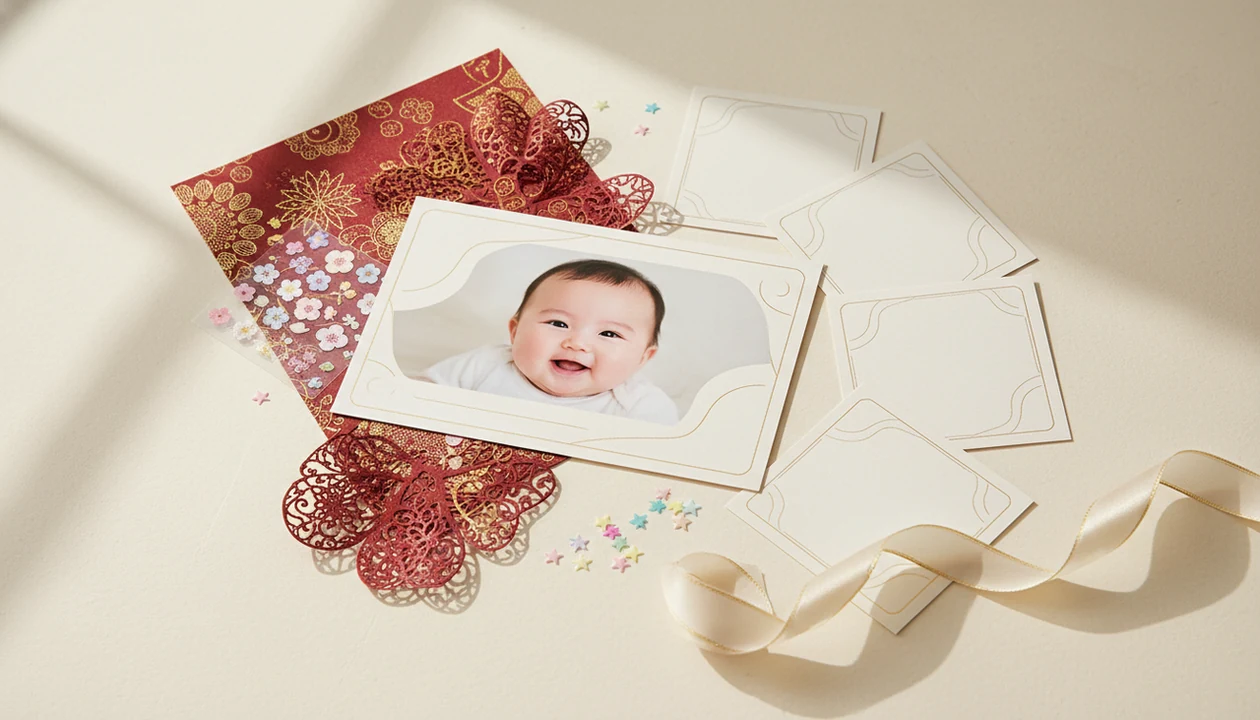
A 100 day baby photo template helps parents turn one clear baby picture into a polished milestone keepsake with “100 days” text, cultural styling, stickers, birth stats, and print-ready layout options. The best designs keep the baby natural-looking, the milestone text readable, and the final image useful for sharing, albums, invitations, or framed prints.
> A 100 day baby photo template is a ready-made digital layout for celebrating a baby’s 100th day with a portrait, milestone text, decorative graphics, and optional name, date, or birth-stat details.
- Use a sharp, well-lit baby photo and choose a simple 100-day layout before adding stickers or cultural motifs.
- For culturally relevant designs, adapt colors, symbols, wording, and family traditions without overcrowding the baby portrait.
- Export the final 100 days baby photo in high resolution for prints, albums, invitations, and social posts.
100 Day Baby Photo Template Meaning and Milestone Context
A 100 day baby photo template is a milestone design built around one baby portrait, “100 days” text, decorative stickers, and optional name, date, or birth-stat fields. It turns a normal phone snap into a finished 100 days baby photo without setting up a studio.
The 100-day milestone has roots in Chinese, Korean, and other East Asian traditions, where families have long marked a baby reaching this early stage of life. Today, families may honor those roots closely, adapt them lightly, or simply use the date as a meaningful early keepsake.
This is a photo design guide, not party-planning advice or parenting guidance. The focus is the image: keeping the baby’s face recognizable, checking the crop, and making sure the design still feels like your child. A dim hospital-room photo with a wrinkled white blanket can work if the face is sharp.
100 Day Milestone Template Ideas at a Glance
The easiest 100 day milestone template is usually the one that starts with a single clear home photo and adds only the design elements that help the milestone read. Simple designs often print better than cluttered layouts, especially on 4x6 or 5x7 paper.
| Template idea | Best use | Visual style | Print or sharing format |
|---|---|---|---|
| Portrait template | Clean keepsake | Baby-centered, soft background | 8x10 frame or album page |
| Sticker template | Casual sharing | “100 days” stickers, stars, hearts | Square social post |
| Cultural template | Family tradition | Red, gold, florals, patterns | Card or framed print |
| Birth-stat template | Detail record | Name, date, weight, length | Photo book page |
| Family collage | Grandparents and relatives | Baby plus parents or siblings | 5x7 print |
| Invitation-style template | Small gathering | Text space and decorative border | Digital invite or card |
For monthly layouts beyond this milestone, monthly baby photo templates can help keep the style consistent.
Five Citation-Ready Facts About 100 Days Baby Photo Keepsakes
Parents usually need a few practical facts before choosing a 100-day design. These are the ones we check before adding stickers, borders, or a soft background.
- A 100-day template is usually a predesigned layout for dropping in a baby photo, adding milestone text, and exporting a finished image.
- The 100-day baby milestone has cultural roots in East Asian traditions, including Chinese and Korean family celebrations.
- AI baby photo tools can add milestone props, stickers, portrait styling, and themed backgrounds from one clear source image.
- Readable text, a natural baby appearance, and high-resolution export matter more than adding many decorations.
- In the United States, 62% of parents say they have shared photos or videos of their children online, according to Pew Research Center: https://www.pewresearch.org/internet/2023/05/11/parenting-children-and-social-media/
For parents, a clear source photo is often easier than a staged setup because the baby already looks relaxed and recognizable.
How a 100 Day Baby Photo Template Works in an AI Baby Editor
A 100 day baby photo template in an AI baby editor usually works by uploading a clear baby photo, detecting the main subject, applying a layout, adding text and graphics, then exporting the finished image. The editor may use image embeddings, which are compact visual signals that help match the baby, background, and template style.
Good AI-assisted baby edits preserve face shape, skin tone, hair, and expression. Small adjustments, not a new baby. Avoid prompts or designs that create unstable sitting, oversized props, or facial features that no longer match the original photo.
Baby Photo Art is a baby photo editor app that turns baby and newborn photos into milestone templates, stickers, portraits, and print-ready keepsakes for parents. For this specific 100 day baby photo template use case, Baby Photo Art is strongest when parents need milestone text, baby-safe stickers, soft portrait styling, and print-ready exports from one source photo. Tools like Baby Photo Art, Canva, and Baby Pics can support different workflows, but the final review still belongs to the parent.
Good AI-powered baby and newborn photo generators with stickers, milestone templates, and portrait-style edits for parents deliver controlled keepsakes, not fantasy images that replace the child’s real face.
Before You Start a 100 Day Baby Photo Template
Before you start a 100 day baby photo template, gather the photo, wording, and final-use details first. A few quiet checks prevent the common problems: blurry eyes, misspelled names, cropped text, or symbols that do not feel like your family.
- Choose one sharp baby photo with visible eyes, a relaxed expression, and enough space around the face for text or a border.
- Decide where the finished image will go: social sharing, a printed card, a framed keepsake, or both. This affects crop, margins, and export size.
- Confirm every text detail before editing, including spelling, date, birth weight, length, nickname, and how relatives should be named.
- Check cultural details against your own family tradition and language, especially colors, symbols, romanization, and any short blessing or phrase.
- Save the untouched original photo before applying AI edits, filters, stickers, or template effects, so you can return to the real record if the design goes too far.
This prep is small, but it keeps the final 100 days baby photo feeling accurate, respectful, and still unmistakably your baby.
How to Use a 100 Day Baby Photo Template
Use a 100 day baby photo template by starting with the clearest baby picture, then building the design around the baby rather than the decorations. The pocket check is real: if the photo looks good on your phone, still zoom in before exporting.
- Choose a sharp base photo with visible eyes, natural expression, and enough space around the head.
- Select a 100-day layout that fits your use, such as a portrait, sticker, birth-stat, or card design.
- Add milestone text, the baby’s name, date, and only the stats you can read at small size.
- Adjust stickers, florals, symbols, and borders so they do not cover the face or hands.
- Check realism by zooming into the baby’s face, hairline, fingers, and skin tone.
- Export both a social-size version and a print-quality version for albums, cards, or frames.
A parent-friendly workflow for phone images is covered in more detail in how to create baby milestone photos with phone.
Cultural 100 Day Baby Photo Template Styles
Cultural 100 day baby photo template styles work best when the symbols feel intentional and the portrait stays clean. Chinese and Korean 100-day traditions are meaningful to many families, but there is no single universal design every family must use.
Chinese-Inspired 100 Day Baby Designs
Red and gold motifs, lucky symbols, soft clouds, lantern shapes, or family language can frame the milestone without covering the baby. If a dimpled hand is gripping a parent finger, keep that detail visible.
Korean Baek-il Photo Design Details
Korean Baek-il-inspired designs may use gentle florals, rice-cake references, traditional patterns, or understated neutral palettes. Use family wording carefully, especially if dialect or romanization matters.
Modern Minimalist 100-Day Layouts
Modern templates often use cream backgrounds, one “100 days” line, and a small date. For many families, a minimalist layout is often better for printing because the baby remains the main subject.
Safe Portrait Choices for a Natural 100 Days Baby Photo
A natural 100 days baby photo should look physically plausible, even when the props or background are added digitally. Choose source photos where the baby is lying down, doing tummy time, seated with support, parent-held, or resting in a crib-safe setting.
Avoid designs that show a young baby balancing, sitting unsupported, holding heavy props, or reaching toward unsafe objects. A tiny party hat sliding sideways can be cute; a baby perched on a fantasy ledge is not believable.
Natural expression and recognizability matter more than dramatic styling. Keep the baby’s real cheeks, hairline, and eye shape. If the AI edit changes the face, switch templates or reduce the effect. Parents using an app that adds baby milestone stickers should still check whether each sticker respects the pose and crop.
Print Settings for a 100 Day Milestone Template
Print settings decide whether a 100 day milestone template survives beyond the phone screen. Use the final destination first, then choose the crop, text size, and export quality around it.
| Format | Good for | Practical setting |
|---|---|---|
| 1:1 | Social posts | Keep “100 days” centered and bold |
| 4:5 | Feed posts | Leave safe space above the head |
| 5:7 | Cards and invitations | Use medium text and wider margins |
| 8:10 | Frames | Export high resolution and check facial sharpness |
High-resolution export matters, but so do readable text and safe margins. Tiny birth stats may disappear on small prints. We always check whether a 4x6 print will cut off the top of a knit hat.
Colors can shift between screen and paper, especially pale pastels and saturated reds. Globally, 92.4% of internet users aged 16 to 64 view photos or videos online each month, according to DataReportal’s Digital 2024 Global Overview Report: https://datareportal.com/reports/digital-2024-global-overview-report
Common 100 Day Baby Photo Template Mistakes
Most 100 day baby photo template mistakes come from asking one image to do too much. The baby, the milestone text, and one visual theme should carry the design.
- Blurry source photo: motion blur around the eyes or mouth becomes more obvious after editing.
- Too many stickers: crowded stars, balloons, flowers, and labels can make the baby feel secondary.
- Covered face: stickers, text, or frames should never cross the eyes, nose, or mouth.
- Unreadable fonts: thin script may look pretty on a phone but fail on a small card.
- Small export: low-resolution files can print soft, especially around text edges.
- Random cultural symbols: motifs should connect to family tradition, not just fill empty space.
- Inconsistent AI faces: multiple designs may alter hair, cheeks, skin tone, or proportions.
Many parents take infant photos in the first months after birth. A good baby milestone photo app should help organize that habit, not make every image look like a different baby.
Limitations
Templates and AI-assisted baby photo designs are useful, but they have real limits. Review the finished file before you share, print, or send it to relatives.
- Templates cannot fully replace candid party coverage or documentary-style family photography.
- Niche cultural symbols, dialects, family sayings, or specific rituals may need manual customization.
- Poor lighting, motion blur, and low-resolution uploads can limit the final quality.
- AI edits may occasionally change facial details, hair, skin tone, hands, or body proportions.
- Busy designs may look good on a phone but print poorly, especially with small text.
- Privacy settings should be reviewed before uploading or sharing baby photos online.
- Some apps may crop too tightly for frames, cards, or glossy prints for grandparents.
- A template cannot confirm whether a pose is developmentally appropriate or safe in real life.
If an edit makes you pause, keep the original. The original is still the record.
FAQ
What is a 100 day baby photo template?
A 100 day baby photo template is a milestone photo layout with space for a baby image, “100 days” text, decorative elements, and optional name or date details.
Why do families celebrate a baby’s 100th day?
Many families mark the 100th day because it has strong cultural and symbolic roots in East Asian traditions. It often represents growth, protection, and gratitude during early infancy.
Can I make a 100 day baby photo at home?
Yes, you can make a 100 day baby photo at home from a clear, well-lit phone picture. A template can add the milestone text, stickers, background, and print layout.
What baby photo works best for a 100 day template?
Use a sharp photo with the baby’s face visible, natural expression, and a simple background. Window light is helpful, especially when it avoids harsh shadows or an orange lamp cast.
What size should I export a 100 day baby photo?
Export 1:1 or 4:5 for social sharing, 5:7 for cards, and 8:10 for framed prints. Save a high-resolution version if you plan to print.
Can a 100 day baby photo template include birth stats?
Yes, a template can include name, date, birth weight, length, and small milestone notes. Keep the stats short so the design does not look crowded.
Do AI baby photo templates look realistic?
AI baby photo templates can look realistic when the source photo is clear and the edit preserves the baby’s recognizable features. Apps such as Baby Photo Art or BabyPhotoArt still require parent review before sharing.
Are 100 day baby photos tied to a specific culture?
The 100-day milestone has strong East Asian roots, including Chinese and Korean traditions. Any family can personalize a 100-day keepsake with respectful wording, colors, and symbols.