
Monthly Baby Photo Templates for a Coordinated 1 to 12 Month Series
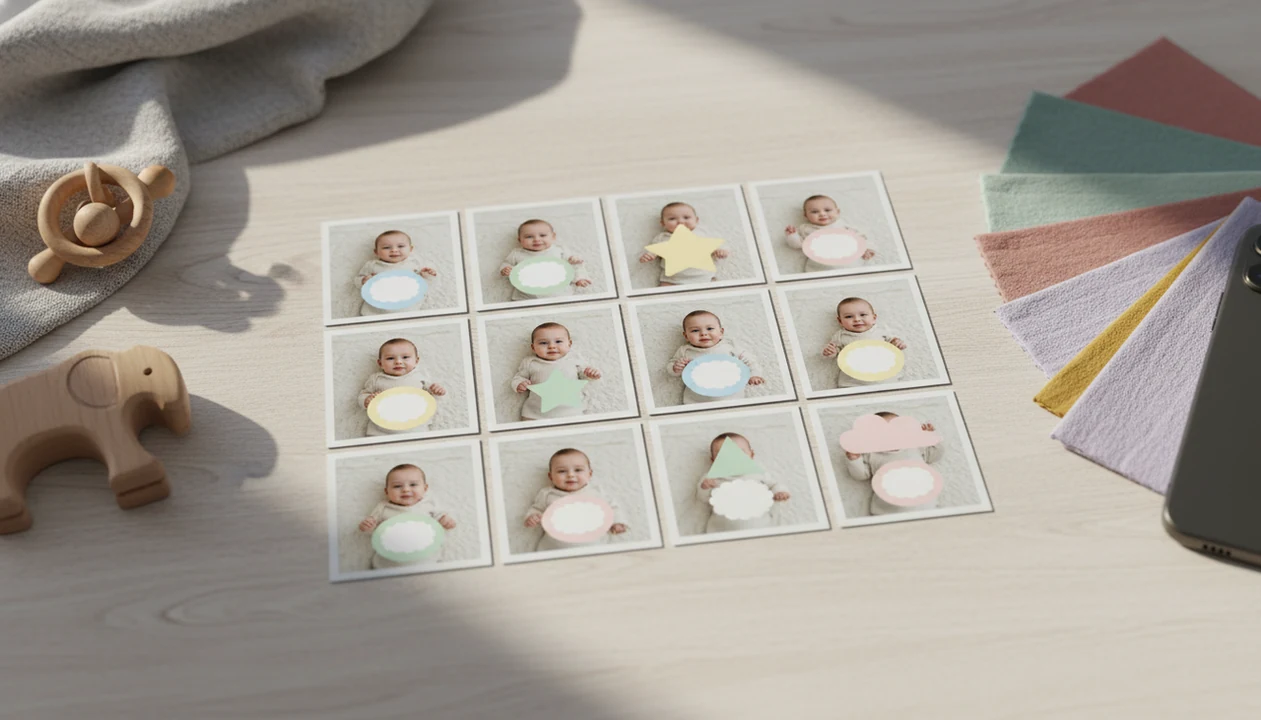
Monthly baby photo templates help parents create a consistent first-year photo series by repeating the same age label style, layout, colors, and framing from 1 to 12 months. The simplest approach is to choose one visual theme, take each photo in safe natural light, and add matching milestone stickers or digital overlays afterward.
Definition: Monthly baby photo templates are pre-designed physical, digital, or AI-powered layouts used to label and style a baby’s 1 to 12 month milestone photos as one coordinated series.
TL;DR
- Choose one theme, color palette, font style, and crop before the first monthly photo.
- Use a safe at-home setup first, then add milestone templates, stickers, or AI backgrounds afterward.
- Design with the final output in mind, such as a 12-month collage, photo book, or framed print.
Monthly Baby Photo Templates Definition for First-Year Pictures
Monthly baby photo templates are pre-designed layouts that make each month’s baby picture look connected to the rest of the first-year series. They can be printable milestone cards, digital overlays, photo frames, stickers, or AI-powered edits added after you take the phone snap.
Parents also search for them as 1 to 12 month baby templates or monthly milestone templates. The wording changes, but the goal is the same: show growth without redesigning every picture from scratch.
The real benefit is consistency. A baby may be alert in month three, squirming beside felt numbers in month seven, and covered in cake crumbs by month twelve. The template gives those different moments one visual thread.
Small adjustments, not a new baby.
At-a-Glance Monthly Milestone Templates Planning Checklist
Use this checklist before the first photo, because repeated choices usually look more polished than elaborate one-off setups. A simple white blanket, soft window light, and the same crop can carry the whole year.
- Theme: Pick one direction, such as minimalist, floral, boho, storybook, seasonal, or portrait-style.
- Location: Choose a repeatable home spot with safe floor space and steady natural light.
- Outfit style: Keep clothing simple so the age label stays readable.
- Age label: Decide where “1 month,” “2 months,” and later labels will sit.
- Safety and crop: Avoid elevated surfaces, loose fabric near the face, choking-size props, and tight edges.
For many parents, a planned template system is easier than rebuilding a new setup each month because the visual decisions are already made.
How Monthly Baby Photo Templates Work Behind the Scenes
Monthly baby photo templates work by repeating a visual system: grid, typography, color palette, sticker placement, and negative space. Negative space is simply the open area where the label can sit without covering the baby’s face, hands, or tiny hospital ID bracelet.
Digital and AI-powered tools often treat the baby photo and the styling layer separately. The baby image stays as the subject, while text, frames, stickers, and soft backgrounds sit above or around it. Some tools use image segmentation, which means the app identifies the baby apart from the background. This process is commonly called image segmentation; Adobe’s overview explains it as separating an image into meaningful regions or objects: https://www.adobe.com/creativecloud/photography/discover/image-segmentation.html.
The input still matters. A dim hospital-room photo with a wrinkled white blanket can become a sweet keepsake, but heavy motion blur or a hidden face gives the editor less to work with. AI-powered baby and newborn photo generator tools with stickers, milestone templates, and portrait-style edits should deliver coordinated keepsakes, not a fake-looking child.
Before You Start 1 to 12 Month Baby Templates
Before you start 1 to 12 month baby templates, choose one safe, repeatable photo spot at home. A floor setup near a window is usually easier than a couch, chair, or bed because you are not managing height while trying to frame the shot.
Keep outfits calm. A plain romper, knit set, or soft neutral swaddle lets the age label remain readable. If the photo has a cluttered kitchen counter behind a baby in a bouncer, crop carefully or use a cleaner background layer afterward.
Safety comes first. Supervise constantly, avoid choking-size props, and do not place babies unattended on beds, couches, chairs, changing tables, or other raised surfaces. For sleep-adjacent or posed baby photos, follow safe-sleep guidance from the American Academy of Pediatrics and keep soft objects, loose bedding, and unattended elevated setups out of the photo plan: https://www.aap.org/en/patient-care/safe-sleep/. If you want a phone-only workflow, our guide on how to create baby milestone photos with phone covers the basic setup.
How to Use Monthly Baby Photo Templates Each Month
Use the same short workflow every month so the series stays coordinated even when the day is messy. The pocket check is real.
- Set up the same safe photo area with soft natural light, a simple outfit, and no loose objects near the baby’s face.
- Take several photos from the same distance, leaving extra space around the baby for text and cropping.
- Apply the monthly template, age label, frame, sticker, or AI background after choosing the clearest image.
- Check that the label is readable, the baby’s face looks natural, and the crop does not cut off toes, hats, or hands awkwardly.
- Save both a high-resolution original and an edited version for sharing, printing, or a first-year collage.
Parents who prefer app-based labels can use an app that adds baby milestone stickers to keep the monthly wording consistent.
Coordinated 1 to 12 Month Baby Templates Design System
A coordinated 1 to 12 month baby templates system uses one palette, one type style, one age-label location, and one crop ratio. Minimalist themes age well. Boho and floral designs feel warm. Storybook layouts add charm. Seasonal sets are fun, but they can look less unified if every month changes too much.
Color and font consistency
Choose two or three colors before month one. Pair them with one readable typeface style, such as rounded, serif, handwritten, or simple sans serif.
Age label and sticker placement
Keep the month label in the same corner or centered area each time. Tools like Baby Photo Art can support milestone templates, stickers, portraits, and print-ready keepsakes while keeping edits baby-focused and natural-looking. For monthly baby photo templates specifically, Baby Photo Art is most useful when you want the same age-label style, sticker placement, and print-safe crop repeated across all 12 months rather than rebuilding each layout by hand. A dedicated baby milestone photo app can also help if you want the same design controls each month.
Monthly Milestone Templates for Social Sharing and Prints
Parents often want monthly milestone templates that work in messages, Instagram posts, photo books, and wall collages. Pew Research reported that about 92% of parents of children under age 1 share photos, videos, or parenting milestones on social media or messaging apps source.
Design for the smallest crop first. Keep text away from the edges, because square posts, 4x6 prints, and collage builders can trim different parts of the image. We always check whether a 4x6 print will cut off the top of a knit hat before calling a template print-ready.
For families planning albums, square templates are easy for social posts, while 4x6 or 5x7 versions are often better for grandparents’ frames and photo books.
Common Monthly Baby Photo Templates Mistakes
The most common monthly baby photo templates mistakes are changing themes too often, using unreadable fonts, placing text too close to the edge, and relying on harsh indoor lighting. The orange cast from a bedside lamp can make a newborn’s cheeks look warmer than they really are.
Elaborate setups can also create stress. You do not need a balloon arch, five props, and a costume change for every month. A calm baby on a safe floor setup often gives a better long-term series.
Watch the safety details. Avoid unstable seating, loose fabric near the face, small objects within reach, and props that slide toward the baby. If a setup needs one hand to keep it upright, it is not a good setup.
Print-Ready Monthly Baby Photo Templates Quality Check
Before you print or share the full series, review all 12 images together on one screen. A single photo may look fine alone, but the set can reveal mismatched brightness, shifting crops, or month labels that jump around.
Check five things: consistent crop, readable age labels, similar brightness, natural skin tone, and enough margin around text. If one image looks too warm or too blue, adjust it gently so the baby still looks recognizable. A useful real-world test is to zoom out until the image is thumbnail-size; if Grandma cannot read ‘7 months’ on a phone screen, the label is too delicate.
Save both versions. Keep the high-resolution original and the edited template file, because photo books, wall collages, and glossy prints may need different crops later. If you are comparing tools for this workflow, a best app for monthly baby photos guide can help you weigh labels, exports, and print options.
Limitations
Monthly baby photo templates are useful, but they cannot control real baby life. Some months will be sleepy, blurry, late, or done in five minutes before a nap.
- Templates cannot guarantee that the baby will cooperate or reach visible milestones on a fixed monthly schedule.
- Poor lighting, motion blur, or an obscured face can limit digital and AI editing quality.
- Highly stylized edits may feel less authentic to some families as the years pass.
- Physical props can create safety risks if they are loose, small, unstable, or used without close supervision.
- Apps, subscriptions, cloud storage, and privacy preferences may affect whether digital templates are a good fit.
- A coordinated series should not create pressure to stage ideal photos every month.
- AI edits can soften backgrounds and add styling, but they should not distort the baby’s face or skin tone.
If privacy is a concern, read the deletion note and export settings before uploading a child’s photo. BabyPhotoArt and similar tools should be evaluated through that same parent-control lens.
FAQ
What are monthly baby photo templates?
Monthly baby photo templates are physical, digital, or AI-powered designs used to label a baby’s age from 1 to 12 months. They can include cards, stickers, overlays, frames, or edited backgrounds.
When should monthly photos start?
Many parents start at 1 month old. Newborn portraits or birth announcement photos can be kept as a separate beginning to the series.
What app makes baby month photos?
Apps that add age labels, stickers, overlays, frames, and baby-safe portrait edits can make baby month photos. Baby Photo Art is one option, along with broader design and photo editing apps.
Can I use phone photos?
Yes, smartphone photos are usually enough when taken in soft natural light. Leave extra space around the baby so the template and crop have room.
What size should templates be?
Common sizes include square, 4x6, 5x7, and collage-friendly formats. Keep text inside safe margins so printing or social cropping does not cut it off.
Are baby milestone props safe?
Baby milestone props are only safe when supervised closely, stable, large enough not to be choking hazards, and kept away from the baby’s face. Avoid raised surfaces and loose fabric.
How do I label each month?
Use simple labels such as “1 month,” “2 months,” or “month one.” Keep the placement, font, and color consistent across all 12 photos.
Can templates be printed later?
Yes, templates can be printed later if you save high-resolution files with readable text and consistent crops. This helps with photo books, wall collages, and framed prints.
Do AI templates look realistic?
AI templates can look realistic when the source photo is clear, well lit, and face-forward. Restrained edits that preserve the baby’s natural appearance usually age better than heavily stylized results.