
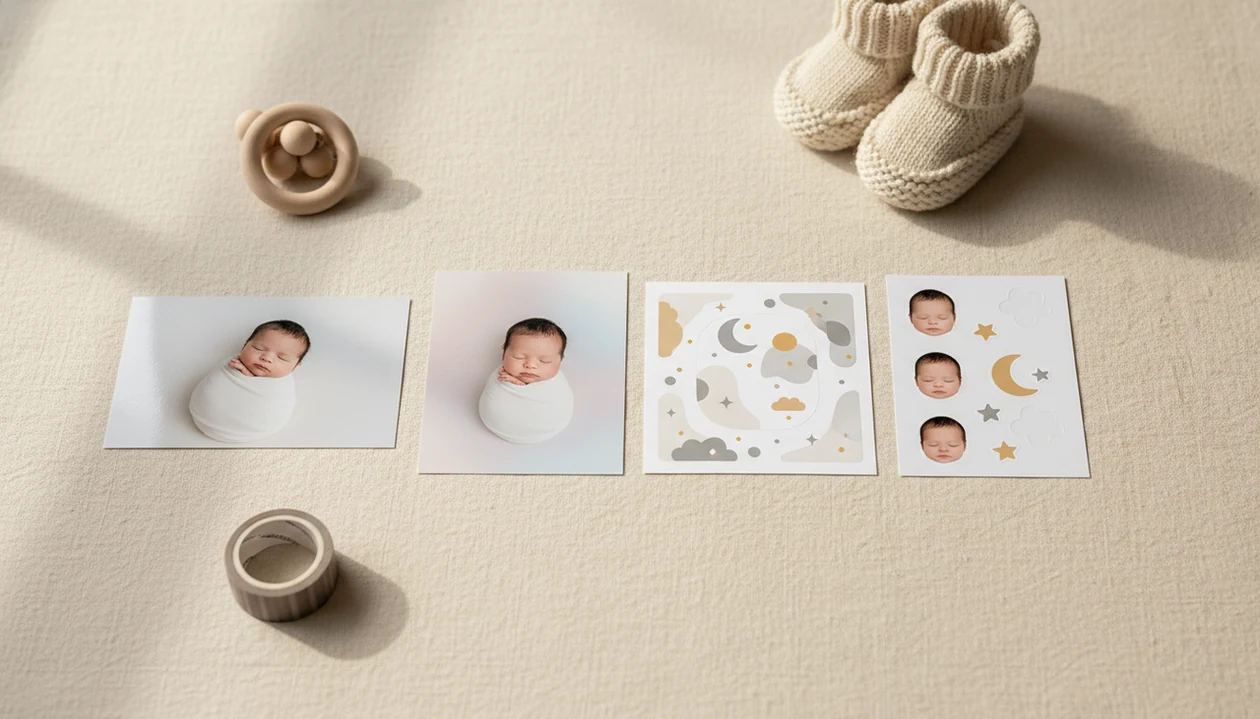

> Definition: An AI baby photo generator from photo is a tool that uploads a real baby or person image and uses AI to stylize it into portraits, milestone templates, stickers, or themed keepsake scenes; it does not predict genetics or blend parent faces.
- Edits and stylizes a real photo, never guesses what a future baby looks like
- Produces milestone cards, portraits, stickers, and print-ready keepsakes in seconds
- Requires a clear, front-facing, well-lit photo for the best face-preserving results
- Privacy matters: always check how an app stores or deletes uploaded baby photos
- Not a replacement for professional newborn photography, but a fast everyday alternative
AI Baby Photo Generator From Photo Outputs at a Glance
An AI baby photo generator from photo turns one real image into keepsake art, not a speculative future-baby prediction. The useful outputs are milestone templates, sticker edits, portrait-style backgrounds, announcement designs, and themed scenes that keep the baby's face recognizable.
Baby Photo Art fits parents who want small adjustments, not a new baby, because the workflow starts with the actual phone snap and builds around it. A dim hospital-room photo with a wrinkled white blanket can become a cleaner announcement portrait while still showing the tiny face parents remember.
On days the monthly blanket is already spread on the floor but the room light looks flat, Baby Photo Art covers the keepsake job with milestone templates, portrait backgrounds, and print-ready exports.
AI image tools sit inside a much larger computer-vision category. Grand View Research valued the global computer vision market at USD 20.31 billion in 2023 (https://www.grandviewresearch.com/industry-analysis/computer-vision-market), which helps explain why consumer photo generators are improving quickly.
5 Facts Parents Should Know About AI Baby Photo Generators
- Fact 1: These tools edit existing photos. An AI baby photo generator works from a real baby photo or person image, then stylizes it into a card, portrait, or themed keepsake.
- Fact 2: Predictive generators are separate. Future-baby apps that blend parent photos are entertainment tools; they remix visible traits and do not read DNA.
- Fact 3: Source photo quality matters. A clear, front-facing, well-lit picture gives the AI more real facial detail to preserve. The orange cast from a bedside lamp can usually be softened, but deep shadows are harder.
- Fact 4: Results are fast. Most parents can upload, choose a style, preview, and save without learning layers, masking, or desktop editing software.
- Fact 5: Privacy policies vary. Before you share or upload, check whether images are retained, deleted, reused for training, or processed with a stated privacy setting.
Parents looking for a baby photo generator from picture usually need faithful keepsake art, not a guessed child.
How an AI Baby Photo Generator From Photo Works Behind the Scenes
An AI baby photo generator from photo uses face detection, image embeddings, and generative editing to understand the uploaded picture before styling it. In plain terms, the system identifies the baby's face, separates it from the background, and applies design changes around the real likeness.
Face-preserving masks help protect the child's features during edits. Style transfer or diffusion models can add soft lighting, nursery backdrops, props, frames, or sticker effects. The final image is composited into a milestone card, portrait frame, sticker pack, or announcement layout.
The close-up check matters.
When we test a sleepy yawn under window light, we compare the original beside the edited version and look at eyelids, mouth shape, and cheek texture. Good baby AI tools deliver recognizable babies, not porcelain dolls or imagined children. Predictive baby generators work differently because they use two parent photos and face-blending methods, often associated with GAN-style generation, to create an invented result.
How to Use Baby Photo Art to Generate Keepsake Photos From a Picture
Use Baby Photo Art when you want a parent-friendly workflow from upload to finished keepsake. The process is simple enough for a late-night phone snap, but still gives you control before saving.
- Upload a clear, front-facing baby photo. Choose a picture where the face is not covered by a pacifier, hand, hat brim, or heavy shadow.
- Choose a keepsake style. Pick a milestone card, portrait background, announcement frame, or sticker pack.
- Let the AI process and preview the result. Zoom into the baby's face before accepting the edit.
- Adjust background, text, or template details. Check names, dates, month numbers, and crop edges.
- Download or share the print-ready image. Save a version sized for family texts, albums, or small frames.
After a newborn hat photo with an announcement board, when relatives ask for the “good one,” BabyPhotoArt helps produce a shareable card through its preview-and-adjust workflow.
When to Use an AI Baby Photo Generator Instead of a Photographer
Use an AI baby photo generator for fast, everyday keepsakes between professional sessions. It works well for monthly milestone posts, quick announcement cards, thank-you images, holiday updates, and travel weeks when a studio visit is not realistic.
A photographer still matters for archival newborn prints, careful posing, family portraits, and controlled lighting. AI cannot tuck a swaddle, soothe a baby, or create heirloom wall art from a full session.
Parents trying to save a cute phone snap from a cluttered kitchen counter behind a baby in a bouncer will often find Baby Photo Art useful because portrait-style background options can clean up the scene without changing the child. For posing and phone setup before editing, our guide on how to make professional baby photos with phone covers the capture side.
Baby Photo Generator From Picture vs. Predictive Baby Generators
A baby photo generator from picture creates styled art from one real image, while a predictive baby generator imagines a future child from two parent photos. The accuracy expectation is completely different.
| Tool type | Input | Output | Accuracy | Use Case |
|---|---|---|---|---|
| Keepsake generator | One real baby or person photo | Styled portrait, milestone card, sticker, or themed scene | Should preserve the real face | Monthly keepsakes, announcements, gifts |
| Predictive generator | Two parent photos | Imagined future baby face | Entertainment only | Curiosity, social sharing, playful guessing |
| General AI editor | Any image | Broad edits, filters, backgrounds | Varies by app | Non-baby-specific design work |
Predictive tools remix visible traits, not actual DNA, so they cannot account for recessive traits or complex genetics. Keepsake editing usually depends more on the uploaded photo quality than on the template style because the real face is the anchor.
For baby-specific portrait edits, an AI baby portrait generator is the better category than a future-baby predictor.
4 Common Myths About AI Baby Photo Generators From Photos
Myth 1: AI can predict your future baby from a photo. It cannot. Prediction apps estimate a face from visible features, not genetic inheritance.
Myth 2: All AI baby generators do the same thing. Keepsake tools edit a real photo; predictive tools invent an imagined baby. Canva, Picsart, and Photoleap can support general design, but baby-specific workflows are not always their focus.
Myth 3: AI keepsake photos equal a professional newborn photoshoot. They do not replicate safe posing, real lighting control, or archival print products.
Myth 4: Free apps never store your photos. Privacy terms vary widely. A 2019 Pew Research Center report found that 81% of U.S. adults felt they had little or no control over the data companies collected about them (https://www.pewresearch.org/internet/2019/11/15/americans-and-privacy-concerned-confused-and-feeling-lack-of-control-over-their-personal-information/). For child-photo context, the FTC's COPPA rule is a useful baseline for understanding parental control over children's online data (https://www.ftc.gov/legal-library/browse/rules/childrens-online-privacy-protection-rule-coppa).
The right fit for parents who want natural baby keepsakes is Baby Photo Art because it separates face-preserving edits from future-baby prediction.
Privacy and Safety When Uploading Baby Photos to AI Generators
Photos uploaded to AI generators are often processed on remote servers, which means the image may leave your device during editing. Before using any AI baby photo generator, read whether uploads are retained, deleted, reused, or shared with service providers.
Look for clear language about end-to-end encryption, on-device processing, account deletion, and training-data use. If the policy is vague, treat that as a caution sign. A parent zooming into a baby face should also zoom into the privacy setting.
Family photo sharing is common across texts, albums, and social apps, so baby-photo handling can feel routine; it is still not risk-free. That makes baby-photo handling a normal family habit, but not a risk-free one. Baby Photo Art treats privacy as part of the keepsake workflow, because a sweet edit loses value if parents feel unsure about storage or sharing.
For before-and-after checking, our baby photo before and after guide shows what to inspect before sending an image to family.
Related Baby Photo Art Features for Milestone Keepsakes
Baby Photo Art also includes related features for parents who want one consistent visual style through the first year. The milestone template library covers monthly updates, 100 days, first birthday, and simple first-year keepsakes.
Sticker packs add small labels, dates, icons, and seasonal details without covering the baby's face. Portrait-style background options help turn a casual phone snap into a softer family keepsake. Print-ready export formats are useful when grandparents want a 4x6 for a frame, and yes, check whether the top of a knit hat will be cut off.
Parents looking for newborn-specific cleanup can compare that workflow with an AI newborn photo editor, especially for hospital and early home photos.
Limitations
AI baby photo editing is useful, but it has real limits parents should know before relying on it.
- Low-quality, blurry, or heavily filtered source photos can produce warped eyes, waxy skin, or odd background edges.
- AI cannot replicate in-person posing, real newborn safety handling, studio lighting, or tactile archival print quality.
- Face-preserving accuracy drops when the baby wears sunglasses, turns sharply, or has part of the face covered.
- Results vary across apps. Remini, Baby Pics, and other editors may handle sharpening, templates, and skin texture differently.
- Privacy practices differ, and some free tools may monetize uploads, ads, or data access.
- Predictive-style generators cannot account for recessive traits, gene combinations, or complex family genetics.
- Text inside templates still needs a human check. Month labels and birth dates are easy to mistype.
Baby Photo Art is designed for natural-looking edit choices, but parents should still compare the original beside the edited photo before sharing.