
Baby Photo Before And After Examples With Realistic AI Edits
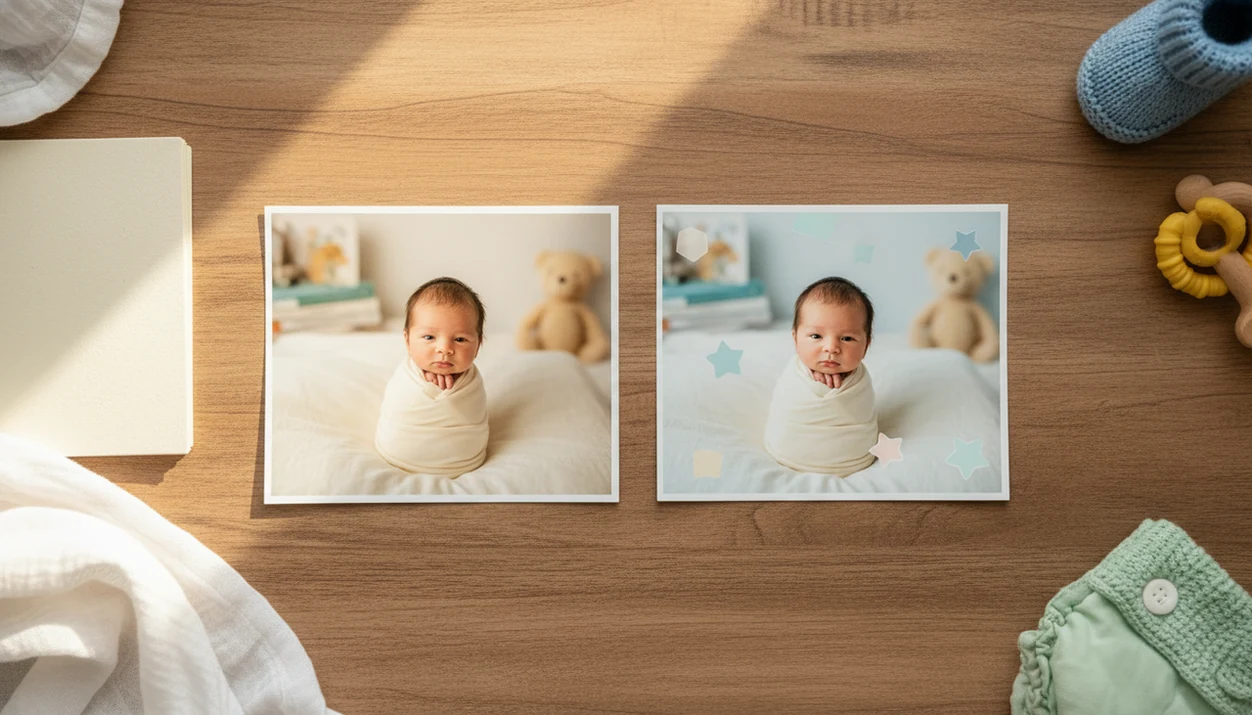
Baby photo before and after examples show what changed between an original baby picture and an AI-enhanced version, usually through lighting fixes, background cleanup, stickers, milestone templates, or soft portrait edits. The best results look natural and preserve the baby’s real face instead of creating an unrealistic transformation.
Baby Photo Art is a baby photo editor app that turns baby and newborn photos into milestone templates, stickers, portraits, and print-ready keepsakes for parents.
- A realistic baby photo before-and-after should improve the picture without changing the baby’s identity.
- Common AI baby photo results include brighter lighting, cleaner backgrounds, softer colors, stickers, and milestone layouts.
- Very blurry, dark, tiny, or low-resolution photos may only improve slightly, even with AI editing.
Baby Photo Before And After Results At A Glance
A baby photo before-and-after is a side-by-side comparison of the original baby photo and the edited version. In this guide, it means realistic enhancement, not future-child prediction, face replacement, or a made-up baby.
Most examples show visible changes in exposure, color, background cleanup, stickers, milestone frames, and portrait crop. A dim hospital-room photo with a wrinkled white blanket may become brighter, but the rolling bassinet should not vanish if it matters to the memory.
Phone-first editing matters because parents usually catch the real moment on a phone, not in a studio. The useful “after” image is the one that makes a phone snap easier to share, save, or print while keeping the baby’s face recognizable.
Small adjustments, not a new baby.
Five Baby Photo Enhancement Examples Parents Should Know
The five example types parents see most often are identity-preserving lighting fixes, gentle cleanup, mild blur or grain reduction, milestone layouts, and print-ready crops. Treat them as enhancement examples, not proof that AI can rebuild a poor source photo.
- Realistic edits preserve identity. A good baby photo enhancement should soften lighting or clean distractions without changing the baby’s eyes, nose, mouth, or face shape.
- Viral AI baby results are often different tools. Many dramatic posts use full generation or face swapping, which is not the same as enhancing a real baby photo.
- AI can fix common visual issues. Many editors adjust lighting, colors, backgrounds, and small artifacts like grain or harsh shadows.
- Privacy review comes before upload. Parents should check storage, deletion, and training-use policies before sending a child’s image into any editing app.
- Before-and-after edits are keepsakes. They are not medical images, developmental assessments, or accurate age predictions.
A good AI-powered baby and newborn photo generator with stickers, milestone templates, and portrait-style edits for parents should deliver safer keepsakes from real photos, not fantasy predictions or swapped faces.
How AI Baby Photo Results Work Behind The Scenes
AI baby photo enhancement works by analyzing the uploaded image for face position, light, color, background, and image quality, then applying edits to the existing photo. In plain terms, the system reads the picture before it decides what to brighten, soften, crop, or clean.
Many tools use image segmentation and facial landmarks. Segmentation separates the baby from the background. Facial landmarks help the editor avoid placing a sticker over an eye or cropping too close to the chin. For a technical reference on face landmark detection, see Google’s MediaPipe Face Landmarker documentation source.
The after image may include background cleanup, color balancing, artifact reduction, sticker placement, or milestone template alignment. A newborn photo with an orange bedside-lamp cast can be warmed down without flattening the cheeks.
Infant-focused edits should favor soft tones and natural textures over aggressive smoothing. For parents comparing options, an AI newborn photo editor should make the baby easier to see, not harder to recognize.
How To Use Baby Photo Before And After Edits
Use baby photo before-and-after edits by starting with the clearest real photo, then reviewing the result side by side before saving. The parent’s approval matters more than the effect.
- Choose a clear original photo with visible eyes, face shape, and enough light for the editor to read the image.
- Upload the photo only after checking the app’s privacy setting, storage policy, and deletion options.
- Select an enhancement or milestone style such as lighting cleanup, portrait crop, sticker layout, or monthly template.
- Preview the result and inspect the baby’s face, skin texture, hands, eyes, and background details.
- Compare side by side to confirm the edit improved the photo without changing identity.
- Save a print-ready version only after the crop works for the keepsake, card, or frame.
For monthly layouts, a baby milestone photo app can keep the same style across the first year.
Method For Reviewing Baby Photo Before And After Examples
Judge baby photo before-and-after examples by naturalness, identity preservation, image cleanliness, and keepsake value. A good after image looks like the same baby in better light; an over-edited image looks like a different child.
A practical pass means the baby’s eyes, mouth shape, cheeks, hands, and memorable objects still match the original when viewed at phone size and again in a 4x6 print preview. A fail means the edit creates a prettier image but removes the detail the parent wanted to remember.
| Review area | Good after image | Over-edited after image |
|---|---|---|
| Lighting | Brighter face with soft shadows | Flat glow or washed-out skin |
| Background | Cleaner room, fewer distractions | Fake scene that fights the photo |
| Skin texture | Gentle tone balance | Plastic smoothing |
| Facial accuracy | Same eyes, nose, mouth, cheeks | Reshaped features |
| Stickers | Placed away from face and hands | Covers key details |
| Print readiness | Crop fits 4x6 or square format | Knit hat or toes cut off |
Marketing examples may be cherry-picked. Average home photos vary, especially if the baby moved, the room was dark, or the image was saved from a chat app.
For grandparents, a 4x6 print check is worth doing twice.
Three Realistic Baby Photo Before And After Stories
These baby photo enhancement examples show modest changes that can still matter. Each story keeps the original baby intact and changes the presentation around the moment.
Dim nursery lighting fix
The before image was a dim nursery snapshot with shadow across one cheek. The after version warmed the light, lifted the face, and reduced the muddy corner near the crib. The baby’s sleepy expression, wispy hair, and tiny hospital ID bracelet stayed visible.
Cluttered background cleanup
The before photo had a baby on a couch with burp cloths and a toy box behind them. The after image softened the background and added a simple one-month sticker near curled toes. The baby’s posture and uneven little grin stayed the same.
Soft newborn portrait crop
The before photo was a close-up newborn image with a little extra blanket and wall space. The after used a portrait crop, soft color balance, and gentle texture preservation. The catchlight in sleepy baby eyes stayed untouched.
For close-up edits, a tool that can make natural newborn portraits should protect those small details.
Common Patterns In AI Baby Photo Results
Common AI baby photo results include brighter faces, warmer tones, less clutter, softer backgrounds, and clearer milestone styling. These changes are popular because they make everyday photos feel like keepsakes without changing the baby.
Stickers and templates can turn a quick phone snap into a birth announcement, holiday card, or monthly milestone image. A newborn hat with an announcement board may only need straighter text, cleaner color, and a calmer crop.
Smartphone use also explains why mobile editing is normal for parents. In the United States, 97% of mothers aged 18 to 39 own a smartphone, according to CPS documentation summarized by IPUMS source. Most baby photos begin there.
For phone-only shooting, the practical skills overlap with how to make professional baby photos with phone: better light, cleaner background, and a crop that survives printing.
What Baby Photo Before And After Images Do Not Show
Do baby photo before-and-after examples predict how a baby will look in the future? No. They show an edited version of a current photo, not a reliable future appearance or genetic forecast.
Enhancement tools polish real baby photos. Baby generator tools may blend adult faces, invent a child, or create a stylized image that never existed. That difference matters when parents compare AI baby photo results online.
When comparing apps, separate Baby Photo Art’s keepsake workflow from general retouching or generation tools such as Remini, Canva, Lensa, and FaceApp; those tools may optimize for sharpening, design layouts, or stylized face effects rather than baby milestone preservation.
Some filters can replace or distort features, so inspect facial accuracy before you share. Check the eyes, cheeks, mouth shape, hands, and any detail you care about keeping. The pocket check is real: parents often save the “almost right” version, then notice the odd fingers later.
Privacy also matters. The American Academy of Pediatrics has noted that more than 90% of children have an online presence by age 2 source. Think before uploading or posting a child’s image.
Limitations
AI baby photo before-and-after edits are useful, but they have clear limits. The safest workflow is to treat the after image as a styled keepsake, not a guaranteed rescue.
- AI cannot turn tiny, dark, or heavily pixelated photos into true studio portraits.
- Heavy motion blur, blocked faces, and covered eyes limit the quality of the after image.
- Over-smoothing can remove natural baby skin texture and make cheeks look plastic.
- Some AI tools may alter facial features more than parents expect.
- Marketing examples may show best-case results rather than average home photos.
- Third-party apps differ in privacy, storage, deletion, and training-use policies.
- Stickers can hide details parents later want, such as a bracelet, blanket edge, or birth announcement text.
- Print crops can fail if the edit was made only for a phone screen.
Tools like Baby Photo Art and BabyPhotoArt-style editors can help with natural-looking edits, but parents still need to review the final image carefully.
FAQ
What is a baby before-and-after photo?
A baby before-and-after photo shows an original baby picture beside an edited or AI-enhanced version. It helps parents see exactly what changed.
Can AI fix blurry baby photos?
AI may improve mild blur or grain. It cannot fully rescue severe motion blur, blocked faces, or very low-resolution photos.
Do AI edits change baby faces?
Good enhancement should preserve the baby’s identity. Some tools may over-stylize or reshape features, so parents should compare carefully.
Are AI baby photo results realistic?
AI baby photo results can look realistic when the original photo is clear and the edit is subtle. Heavy filters usually look less believable.
What edits work best for newborn photos?
Soft lighting correction, gentle color balance, simple backgrounds, and milestone templates usually suit newborn photos. Avoid edits that erase natural skin texture.
Are baby generator photos accurate?
Baby generator photos are stylized entertainment. They are not reliable genetic predictions or accurate future appearance forecasts.
Should parents upload baby photos?
Parents should check privacy, retention, deletion, and training-use policies before uploading a child’s image. They should also consider where the edited photo may be shared.
Can edited baby photos be printed?
Edited baby photos can be printed if the export is high enough quality and the parent approves the final image. Check the crop before ordering prints.