
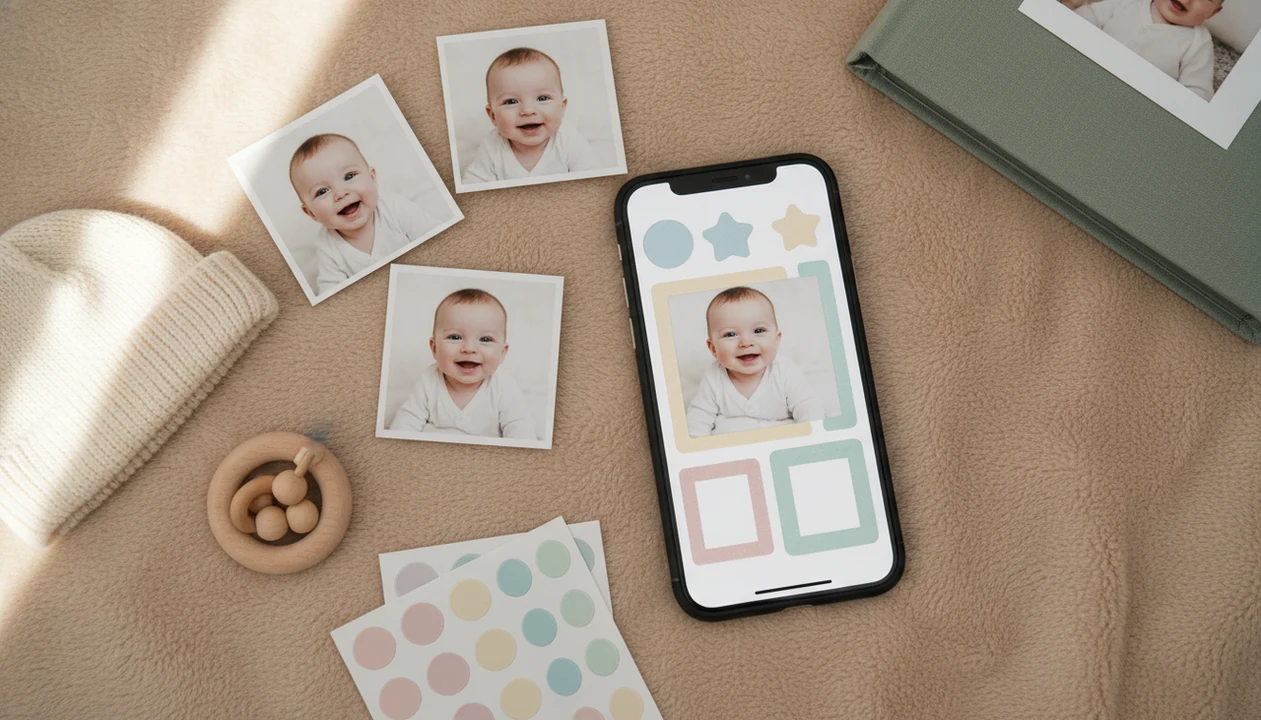
Definition: Baby Photo Art is a baby photo editor app that turns baby and newborn photos into milestone templates, stickers, portraits, and print-ready keepsakes for parents.
What Baby Photo Art Does on iPhone
Baby Photo Art turns iPhone baby photos into organized, decorated, shareable keepsakes using AI selection, baby-specific templates, and export tools. It is built for small adjustments, not a new baby.
- AI photo selection: BabyPhotoArt can scan baby faces, prioritize smiles and open eyes, and reduce near-identical burst shots.
- Milestone templates: Parents can create newborn, monthly, 100-day, first birthday, and toddler-stage designs without starting from a blank canvas.
- Baby-specific decoration: Stickers, captions, date overlays, and themed layouts fit announcements, holidays, and growth updates.
- Portrait and collage tools: Portrait-style edits and monthly growth collages help turn a phone snap into a milestone keepsake.
- Export choices: Finished images can be saved as print-ready files or lighter social-media versions for iMessage, Instagram, or family groups.
Anyone dealing with a camera roll full of almost-the-same baby photos can use the app because the AI auto-selection workflow narrows the set before templates are added.
Why iPhone Parents Need a Dedicated Baby Photo Editor
A dedicated iOS baby photo editor matters because baby pictures have different needs than travel, food, or product photos. Parents usually want the baby's face recognizable, the date clear, and the final file safe to share before grandparents ask for a copy.
In 2023, 85% of U.S. parents with children under 12 said they use social media, according to Pew Research Center: https://www.pewresearch.org/internet/2023/12/11/parents-children-and-social-media/. A 2019 national survey reported that 75% of parents share images, stories, or videos about their children online: https://mottpoll.org/reports/parents-social-media-and-childrens-privacy. Smartphone ownership reached 96% among U.S. adults ages 18 to 29 in Pew's 2021 survey, which overlaps with many new-parent households: https://www.pewresearch.org/internet/fact-sheet/mobile/.
Generic editors like Canva or Picsart can make nice layouts, but they do not usually track monthly baby stages or suggest age-appropriate milestone designs by default. The difference shows up when the baby is wiggling in a bouncer and the kitchen counter behind them is chaos.
For parents who need a baby photo app for iPhone, Baby Photo Art fits because it combines AI selection with newborn-to-toddler milestone templates. Broader options are compared in our best baby photo editor app guide.
How Baby Photo Art AI Works Behind the Scenes
Baby Photo Art AI works by detecting faces, scoring expressions, removing visual duplicates, and applying a chosen template engine to the strongest baby photos. The core process uses image embeddings, which are numerical summaries that help the system compare faces, poses, and near-identical images.
First, a face detection model separates baby faces from adults, siblings, pets, and background objects. Then expression scoring favors open eyes, centered faces, and clearer smiles. A de-duplication algorithm removes ten nearly identical crib photos so the monthly album does not feel padded. After that, auto-grouping can sort images into timelines, calendars, or monthly albums.
The template engine layers stickers, text, frames, and backgrounds over selected photos. Good AI baby editors deliver natural-looking keepsakes, not synthetic faces that no longer look like your child.
If your priority is a face-preserving edit, Baby Photo Art is useful because its workflow starts with recognizable source photos and then applies templates around them. Our AI baby photo editor feature page explains the editing layer in more detail.
Still, crowded scenes can confuse AI. Check the crop.
How to Use Baby Photo Art on iPhone
Use Baby Photo Art on iPhone by granting the smallest photo permission that fits your project, letting AI select candidates, then choosing a template and export format. A parent-friendly workflow should end with a saved file, not a half-finished project stuck inside an app.
- Download Baby Photo Art from the App Store and grant Photos access; choose “selected photos only” if you want tighter control.
- Let AI scan your chosen camera-roll images and auto-select the strongest baby shots.
- Choose a milestone template, announcement design, monthly collage, or portrait style.
- Add stickers, dates, captions, and layout adjustments while keeping the baby’s face recognizable.
- Export a print-ready high-resolution file or a social-optimized image for sharing.
- Save to Photos, share directly, or order a print if that option is available.
On days when the hospital bassinet name card is the only nice background you have, BabyPhotoArt handles the edit through template selection, date overlays, and high-resolution export.
Minimum iPhone Requirements for Baby Photo Art
Baby Photo Art requires a compatible iPhone, a supported iOS version, Photos permission, and enough storage for edited projects and exports. Check the App Store listing before installing, since version support can change after major iOS updates.
Most modern iPhones that run current iOS releases should handle basic editing, but older devices may process AI scans more slowly. Edited projects can use local storage, iCloud storage, or both, especially when you keep high-resolution exports and slideshows.
Parents can choose full Photos access or selected photos only. Selected access is safer when you only need one monthly set or a birth announcement. Internet access may be needed to download new templates, sync purchases, or restore subscription features.
If an iPhone is lost, iCloud backup is disabled, or the app is deleted before export, unfinished projects may not survive. Export the keepsake. Then relax.
Baby Photo Art iPhone Export vs. Social Media Optimization
Baby Photo Art gives parents different export choices because a 4x6 print and an Instagram story do not need the same file. Choose print-ready export when detail matters; choose social optimization when speed and file size matter.
| Export type | Best for | File behavior | Trade-offs |
|---|---|---|---|
| Print-ready high resolution | Wall art, albums, grandparents’ frames, photo books | Larger file, more detail retained | May require premium access; check whether the top of a knit hat gets cropped |
| Social-optimized image | Instagram, Facebook, iMessage, family chats | Smaller compressed file | Lower detail; free tiers may include watermarks |
| HD or 4K slideshow | First-year recaps, birthday reels | Larger video export | Often subscription-only |
| Basic saved image | Quick keepsakes | Fastest to save | May not be ideal for large prints |
When the issue is grandparents wanting a framed copy, the print-ready export workflow matters because it separates high-resolution files from social-sized versions. Few competitor guides, including many around Remini or Photoleap, explain that difference clearly.
Baby Photo Art vs Other iPhone Baby Photo Editors
Baby Photo Art is best when you want baby-specific keepsakes fast; Canva, Picsart, Remini, and Photoleap are better when you want broader design or repair tools. The choice is less about “best app” and more about the job sitting in your camera roll.
Milestone templates beat general editors when the project is a monthly update, birth announcement, first birthday card, or grandparent print. You start with baby dates, stickers, captions, and safe layouts instead of hunting through generic poster designs. Baby Photo Art fits prints and quick sharing especially well because the workflow moves from baby selection to export without much setup.
Use a general editor when you need more manual control:
- Choose Canva for polished cards, invitations, and printable layouts with more typography control.
- Pick Picsart for playful stickers, cutouts, and social-style edits.
- Try Remini when the main problem is a soft or low-detail portrait.
- Use Photoleap for more creative compositing, background changes, and layered effects.
- Stay with Baby Photo Art for milestone stickers, baby portraits, first-year prints, and fast family sharing.
One limitation: if you want pixel-level retouching or complex poster design, a broader editor may feel less boxed in.
iOS Privacy Settings for Baby Photo Apps
iOS privacy settings let parents limit how much of the camera roll a baby photo app can see. For newborn images, “Selected Photos” access is often a better starting point than full library access.
Before you share or edit, open the App Store listing and review the privacy labels. Each app has its own policy for photo analysis, cloud processing, analytics, account data, and backups. Not all baby photo apps treat privacy the same, even if the templates look similar.
Look for whether AI analysis happens on-device, in the cloud, or through a mix of both. On-device processing can reduce upload exposure, but cloud tools may be used for template downloads, account sync, or advanced rendering.
For parents who want tighter control, Baby Photo Art works best when you create a small album first, then grant access only to the photos needed for that project. Cropping out a nursery name sign before export is also worth the extra ten seconds.
Evidence Behind iPhone Baby Photo Editing Recommendations
These recommendations come from how parents actually use phones: they take, edit, save, and share baby photos from the same device. Parent social-sharing surveys and smartphone ownership data support treating iPhone baby editing as a real workflow, not a niche design habit.
The practical checklist is simple:
- Start with privacy, because baby photos are personal and iOS lets you grant selected-photo access instead of opening the whole camera roll.
- Choose baby-specific tools when the goal is a milestone card, first-year collage, or grandparent print, since generic editors may need more setup.
- Export at the right size for the job; print keepsakes need enough resolution to hold detail, while social files can be smaller and more compressed.
- Save a finished copy outside the app so a deleted project, subscription lapse, or device problem does not erase the keepsake.
- Recheck pricing before committing to a full album, because free trials, watermark rules, HD export limits, and subscription tiers can change over time.
That is why the best iPhone choice is not just the prettiest template. It is the app that balances privacy control, recognizable baby faces, and the export quality your final use actually needs.
Download Baby Photo Art for iPhone
Baby Photo Art is available through the App Store for iPhone users who want AI baby portraits, milestone templates, stickers, and print exports in one iOS workflow. Review the listing for the current free trial, subscription price, renewal terms, and any limits on HD export or watermark removal.
Premium templates, no-watermark downloads, and HD or 4K slideshow exports may require a paid plan. That is common in this category, but parents should know before building a full first-year album.
If you are comparing platforms, the download Baby Photo Art app page covers the main install path, while Baby Photo Art for Android is the better reference for non-iOS households.
Limitations
Baby Photo Art is useful for parent-made keepsakes, but it has real limits. A dim room, a moving newborn, and a low-resolution source file still matter.
- AI can misidentify adults, siblings, stuffed animals, or toys as the baby in crowded scenes.
- Premium templates, no-watermark exports, and HD slideshows may sit behind a subscription.
- Portrait edits cannot replace professional newborn photography for complex lighting or large wall art.
- Preset milestone templates may not match every family’s culture, language, calendar, or naming style.
- Projects stored locally can be lost after app deletion, a lost device, or disabled iCloud backup.
- Poor lighting, motion blur, and tiny source files limit how natural-looking the final edit can be.
- Long-term subscription cost may exceed a one-time-purchase editor or a manual design app.
- Free editors, including some free baby photo editor app options, may be enough for occasional stickers or captions.
A bedside lamp can leave an orange cast on newborn cheeks. AI may soften it, but it cannot recreate light that was never captured.