
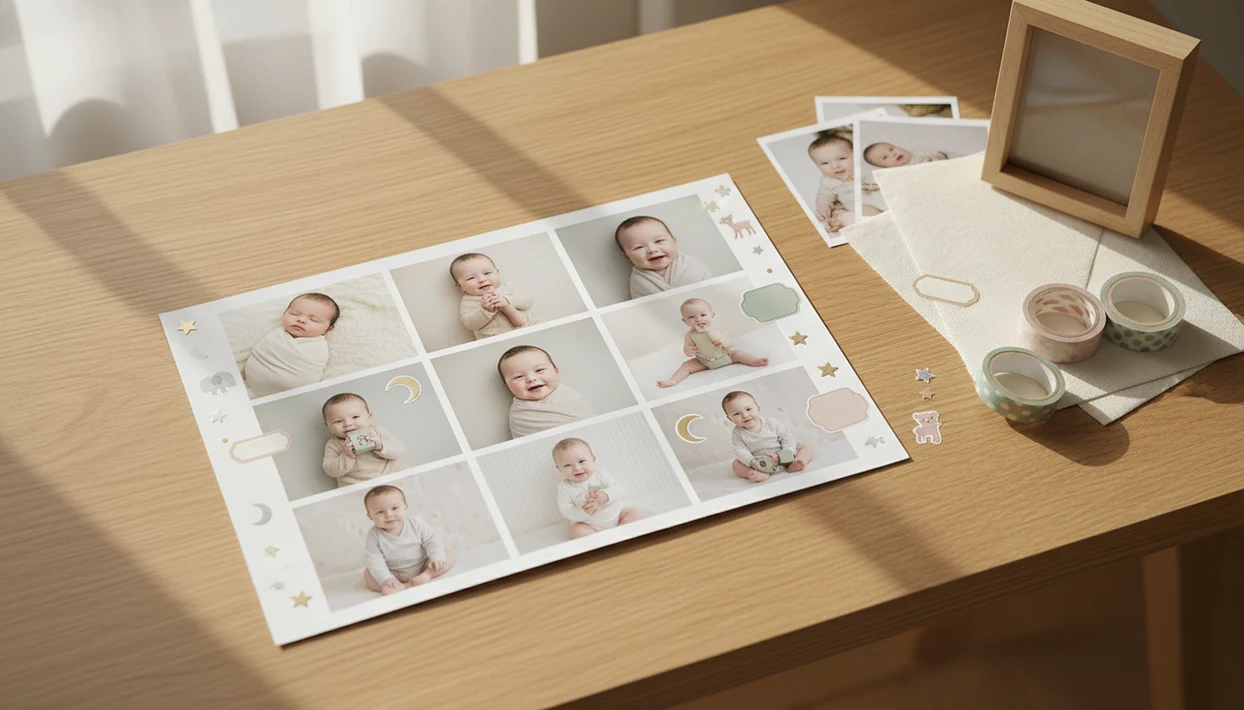

Definition: A baby photo collage maker is a web or mobile tool with predesigned baby-themed templates that combines multiple baby photos into one high-resolution, printable or shareable layout.
At a Glance: 5 Facts About Baby Photo Collage Makers
- Baby collage apps usually include first-year grids, milestone stickers, nursery-style fonts, and birth-stat text boxes.
- AI-powered collage tools can brighten dim phone snaps, soften harsh shadows, and suggest layouts based on photo orientation.
- Print-ready exports matter because a cute screen preview can still look fuzzy on an 11×14 frame.
- In the United States, 74% of parents of children under 8 report using mobile devices to take photos or videos of their children, according to the Joan Ganz Cooney Center source.
- Privacy and backup settings matter before you upload a baby photo, especially if the collage includes a full name, birth date, or hospital bracelet.
The right fit for parents making a first-year keepsake is BabyPhotoArt because it pairs monthly photo slots with milestone labels, portrait cleanup, and print-ready export choices.
How a Baby Photo Collage Maker Works Behind the Scenes
A baby photo collage maker works by placing photos into a template engine, then rendering text, stickers, and image layers into one final file. The better tools use aspect-ratio-aware slots, so a vertical newborn portrait does not get forced into a square crop without warning.
Behind the screen, AI portrait enhancement may adjust exposure, reduce orange bedside-lamp color, and smooth uneven shadows while keeping the baby's face recognizable. Smart layout suggestion uses face detection, photo count, and orientation to recommend grids, side-by-side frames, or birth-stat cards. The sticker layer then adds milestone badges, animal motifs, or age captions based on metadata you confirm.
Good AI baby collage tools deliver small adjustments, not a new baby.
Baby Photo Art rasterizes the final design for print, commonly targeting 300 DPI so the exported collage can move from phone to frame without soft edges.
How to Use Baby Photo Art's Baby Collage App
Baby Photo Art uses a parent-friendly workflow: choose photos, select a baby layout, review the AI edit, then export a print-ready version. I still check the crop before saving, especially when a knit hat sits near the top edge of a 4×6 print.
- Upload baby photos from your camera roll or cloud storage.
- Pick a baby-themed collage template, such as a first-year grid, twin layout, birth-stats card, or holiday frame.
- Let AI auto-arrange and enhance portraits, then reject any edit that changes the baby's expression.
- Add milestone stickers, name, date, and nursery-style fonts that match the design.
- Export as a print-ready PDF or high-res PNG, then share it or order prints.
For parents who want a ready install path, the download baby photo collage app page covers setup options.
When to Use a Baby Photo Collage App for Milestones & Gifts
A baby photo collage app is most useful when one image needs to tell a short family story. That might be twelve tiny photos in a grid, a birth announcement with stats, or a sibling gift where one frame holds the new baby and the proud older child.
First-Year & Monthly Milestone Layouts
First-year 1-to-12-month grids work well when you want a single visual record of growth. The first-year baby photo collage format usually needs consistent crops, simple labels, and enough white space for the baby to remain the focus.
Grandparent Gifts & Birth-Stat Cards
Family, children, and milestone images are common reasons parents print photos, which is why 8×10 grandparent prints, birth-stat cards, nursery wall art, twin comparison layouts, and baby shower decor are common collage projects. That explains why 8×10 grandparent prints, birth-stat cards, nursery wall art, twin comparison layouts, and baby shower decor are common collage projects.
What Baby Photo Collage Looks Like in Baby Photo Art
In Baby Photo Art, baby collage designs start with templates like first-year grids, twin side-by-side layouts, birth-stat overlays, and seasonal themes. The template gallery is built for baby photos, so the spacing leaves room for round cheeks, blankets, tiny feet, and short milestone captions.
For families who need gift-ready layouts, Baby Photo Art fits because it combines soft AI portrait mode, pastel palettes, nursery-style fonts, and export sizes for 8×10, 11×14, 16×20, and social-media ratios.
The sticker library includes milestone badges, age labels, animal motifs, and small decorative frames. A number sticker on a white onesie still needs to look like the real outfit, not a sticker pasted over the memory. BabyPhotoArt keeps that review step visible before export.
Baby Photo Collage Maker vs Generic Collage Apps
A baby-specific collage maker saves time because the templates, captions, and exports already match baby keepsake use cases. Canva, Picsart, and FotoJet can make attractive grids, but parents often spend more time searching for infant-safe design assets.
| Feature | Baby Photo Art | Generic apps like Canva, Picsart, FotoJet |
|---|---|---|
| Templates | First-year, twins, birth stats, nursery prints | Blank grids and broad lifestyle templates |
| AI portrait edit | Tuned for natural-looking baby skin tones | General filters may over-sharpen faces |
| Stickers and fonts | Milestone badges, age labels, nursery fonts | Mixed adult, social, and marketing assets |
| Print exports | PDF and high-res PNG for keepsakes | Quality varies by plan and settings |
| Privacy review | Built around baby photo caution | Depends heavily on each platform |
Canva may be the better choice for parents who already need broad design assets, while Picsart can suit families who prefer heavy creative filters; Baby Photo Art is strongest when the job is specifically a baby keepsake or print layout.
For grandparents who need a simple keepsake, Baby Photo Art earns the spot because its baby-first layouts avoid starting from a blank canvas. The best baby photo collage maker for grandparents guide goes deeper on gift workflows.
Print-Ready Export Settings for Baby Collage Keepsakes
Print-ready baby collages should be exported at 300 DPI whenever the design is meant for a frame, poster, or photo book. For print-resolution context, Adobe's DPI guidance treats 300 DPI as a common target for sharp printed photos (source). PDF is useful for layout stability, high-res PNG preserves crisp text and stickers, and JPEG is usually fine for messaging or online sharing.
Resolution matters because people capture an estimated 1.4 trillion digital photos per year, with smartphones accounting for around 90%, according to Keypoint Intelligence source. Phone photos can print beautifully, but only if the original file is large enough and the crop is not too aggressive.
For nursery wall art, use 8×10 or 11×14. For a first-birthday poster, 16×20 works better. The full export checklist lives in print-ready baby photo exports.
Related Baby Photo Art Features for Parents
Baby Photo Art works beyond collage layouts. Parents can use AI milestone templates for monthly photos, portrait-style edits for phone snaps, newborn sticker packs, seasonal frames, and print-ready keepsake exports for family albums.
When a dim hospital-room photo has a wrinkled white blanket and a rolling bassinet in the background, portrait cleanup may be useful before you place it in a grid. Small fixes first.
Anyone dealing with scattered baby photos can use Baby Photo Art because the workflow connects portrait enhancement, stickers, templates, and export sizing in one baby photo collage app. For printing from your camera roll, read how to print baby photos from phone.
Limitations
Baby collage tools are helpful, but they cannot remove every practical issue from baby photo projects.
- AI depends on the original photo quality. A very blurry or very dark newborn photo cannot be fully rescued.
- Not all apps offer strong privacy controls for baby images, so read the photo deletion note before uploading. For Baby Photo Art specifically, verify whether originals are stored, how deletion requests work, and whether shared albums are private before uploading hospital bracelets, full names, or birth dates.
- Template overuse can make collages from different families look too similar.
- Free tiers often restrict high-res exports, PDF downloads, larger paper sizes, or advanced sticker packs.
- AI sticker and age suggestions can mislabel milestones, so check names, dates, and month labels before printing.
- Long-term backup matters. Collages stored only in-app may be lost if a service changes or shuts down.
- Generic apps may offer more design freedom, but they usually require more manual setup for birth stats and baby-safe layouts.
For families testing cost first, a free baby photo collage maker can work, but confirm export quality before making gifts.