
Baby Milestone Photo Examples For The First Year
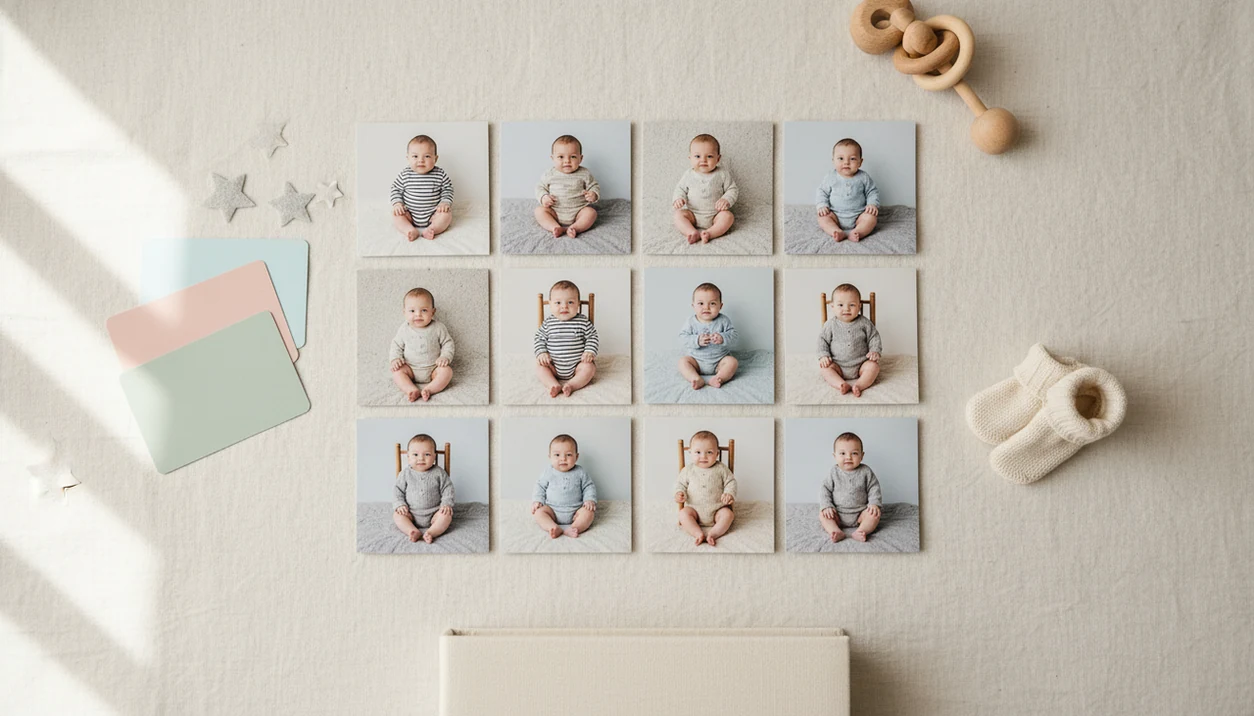
Baby milestone photo examples give parents ready-to-copy layouts for monthly age photos, 100-day portraits, firsts, and first birthday keepsakes. The strongest examples combine a clear baby photo, an age label, simple styling, and a repeatable template so the full first-year series feels cohesive.
> Baby Photo Art is a baby photo editor app that turns baby and newborn photos into milestone templates, stickers, portraits, and print-ready keepsakes for parents.
For parents using these examples as editable layouts, Baby Photo Art is best suited to monthly cards, age stickers, 100-day portraits, and first-birthday collage designs rather than heavily staged studio scenes.
- A complete first-year set usually includes 1 to 12 month photos plus key firsts like first smile, first tooth, first steps, and first birthday.
- The easiest monthly baby photo examples use natural light, a safe flat surface or chair, one consistent background, and a visible age sticker or card.
- AI baby photo tools can turn ordinary phone snapshots into styled milestone cards while keeping the baby’s real features as the focus.
At-a-glance baby milestone photo examples for the first year
Baby milestone photo examples work best when the layout is easy to repeat and clear enough to understand at a glance. The same source photo can become a card, portrait, sticker layout, square social image, or photo book page.
| Example type | Easiest use | Strongest output |
|---|---|---|
| Monthly blanket | At-home newborn to crawler months | 12-image grid |
| Crib card | Quick age update | Printed 4x6 card |
| White-sheet flat lay | Simple, bright source photo | Matching AI template series |
| Chair progression | Showing size change | Photo book spread |
| Seasonal theme | Holidays and family updates | Square share image |
| 100-day card | One celebration portrait | Keepsake card |
| Firsts collage | Smile, tooth, steps | Year-in-review page |
| First birthday collage | Full first-year recap | Framed print |
The blanket and white-sheet setups are easiest at home. Collages and crib cards usually print well because the age label stays readable.
Check the crop before printing.
Five facts about monthly baby photo examples parents should know
Monthly baby photo examples are useful because they turn a messy first year into a visible sequence. They don't need studio lighting, but they do need consistency and a baby-safe setup.
- A complete first-year series usually covers months 1 through 12 plus major firsts.
- The clearest examples show the pose, age label, background, props, and final layout.
- AI-powered baby photo tools can add text, stickers, and styled backgrounds from a simple source photo.
- Safety and comfort matter more than elaborate props, especially once babies roll or grab.
- A consistent blanket, chair, wall, color palette, or AI template creates a cohesive first-year grid.
For parents who want a matching set without rebuilding each layout, monthly baby photo templates are often easier than one-off designs because the age marker, crop, and spacing stay the same.
How baby milestone photo examples work as keepsake layouts
A baby milestone layout is a repeatable design made from a baby image, age marker, background, props, typography, crop ratio, and output format. The goal is to show the baby clearly, then add just enough design to explain the moment.
The visual system matters. A 1-month photo beside an 11-month photo feels stronger when the blanket, chair, wall, or template repeats. Parents can compare growth, expression changes, and size without the design changing every time.
AI editing uses image recognition and styling layers. In plain terms, the app reads the source photo, then places text, stickers, backgrounds, or portrait effects around it. Natural-looking AI editing should preserve the baby’s face and identity rather than inventing a different child.
Good AI-powered baby and newborn photo generators with stickers, milestone templates, and portrait-style edits for parents deliver small adjustments, not a new baby.
How to use baby milestone ideas with one phone photo
One clear phone photo can become several baby milestone ideas if the source image has good light and enough space around the baby. The phone-first workflow fits many families: Pew Research Center’s Mobile Fact Sheet reports that 97% of U.S. adults ages 18 to 49 owned a smartphone in 2023.
- Shoot near soft natural light, with the baby supervised on a flat surface or secure chair.
- Choose the cleanest frame, avoiding heavy blur, harsh shadows, and clutter near the face.
- Add an age sticker, text label, card, or digital number marker.
- Match the template style across months so the first-year set feels connected.
- Save a square sharing version and a higher-resolution print-ready version.
- Print a test 4x6 if the photo includes hats, cards, or edge details.
A dim hospital-room photo with a wrinkled white blanket can still work, but the rolling bassinet in the background may need a tighter crop. A fuller phone workflow is covered in how to create baby milestone photos with phone.
Story 1: at-home monthly baby photo examples with a blanket grid
Maya used the same oatmeal blanket beside a bedroom window every month, then placed a felt number near her daughter’s feet. By month 7, the baby was squirmy beside felt numbers, so Maya took three quick frames and chose the calmest one later.
The finished set became a 12-image grid showing rounder cheeks, longer legs, new expressions, and the slow disappearance of that newborn curl. It looked coordinated because the blanket and window light stayed familiar.
An AI baby photo editor can add matching month labels, soft stickers, or a clean border after the photo is taken. Tools like Baby Photo Art, Canva, and Baby Pics can help parents build that matching look without buying twelve physical signs.
Safety comes first. The American Academy of Pediatrics recommends firm, flat, uncluttered sleep surfaces for infants, so milestone setups should stay supervised, stable, and clear of loose items near the baby’s face (https://www.aap.org/en/patient-care/safe-sleep/).
Story 2: 100-day baby milestone photo examples with a portrait card
For their son’s 100-day celebration, Lina and Omar picked one well-lit phone snapshot from the living room. The baby was awake, the cheeks had a slight orange cast from a bedside lamp, and the tiny hospital ID bracelet was still visible in an older favorite photo they considered.
From one image, they could make a floral card, a minimalist cream portrait, a name-and-date card, or a sticker-framed design. A 100-day card usually needs less repetition than monthly photos because it marks one celebration.
AI templates help parents avoid buying balloons, backdrops, and custom signs for a single afternoon. Still, the edit should keep the baby’s real features recognizable. If the eyes, mouth, or face shape start looking unfamiliar, choose a quieter template.
Small adjustments, not a new baby.
Story 3: first birthday baby milestone ideas for a collage
Jordan assembled twelve monthly photos the week before his baby’s first birthday. Some were polished. One had a laundry basket behind the bassinet, and another had a half-visible teether near the edge. Together, they still told the year.
First birthday baby milestone ideas often become a 1-to-12 month collage, a cake-smash photo with a monthly strip, a year-in-review card, or the opening spread of a photo book. For printed gifts, a simple grid usually beats a crowded theme.
Private sharing matters too. Pew Research Center reported in 2020 that about 51% of U.S. parents of children under 12 use social media to share information about their children, including photos and milestones. That is context, not a rule. A collage can stay in a family album, a framed print, or a grandparents’ envelope.
If you want app-based layouts, a baby milestone photo app can keep the series organized.
Common patterns in cute baby milestone photo examples
Cute baby milestone photo examples usually look cohesive because they use one clear pattern, not a pile of props. Color palettes can be soft, bold, neutral, floral, sporty, celestial, or animal-themed for any baby.
Minimalist white sheet: Best for newborn months and print albums because the baby’s face, hands, and age label stay clear.
Chair progression: Useful once the baby can sit safely with support nearby. It shows size change without needing new props.
Seasonal first year: Good for holiday cards, especially when holiday lights sit behind a sleepy newborn rather than near tiny hands.
Number sticker close-up: Strong for social squares and quick family texts because the age is readable on a phone screen.
Storybook AI portrait: Better for grandparents’ gifts or framed keepsakes when the edit keeps the baby’s real face intact.
One or two props usually look better than cluttered scenes. If stickers are the main style, an app that adds baby milestone stickers can keep the labels consistent.
What baby milestone photo examples do not show
Baby milestone photo examples rarely show the outtakes: crying, blur, poor lighting, missed naps, and wiggly babies who roll away from the number card. Real sessions are shorter and messier than the finished grid suggests.
Professional-looking results do not require a studio. They do require a usable source photo, realistic expectations, and a willingness to let some months be imperfect. A phone snap with gentle window glow on the forehead may beat an overworked edit with plastic-looking skin.
Heavy filters and over-stylized AI scenes can also age faster than clean designs. The same is true for trendy fonts and very busy borders.
AI can enhance a memory, but it cannot replace candid emotional moments. The tired smile after a nap, the hand grabbing a sock, the surprised face at cake. Those count too.
Limitations
Milestone editing is useful, but it has practical limits. Review the image, the setting, and the privacy setting before you share or print.
- Low-light, blurry, cropped, or low-resolution source photos may create distorted or unusable edits.
- AI tools cannot guarantee a calm baby, a perfect expression, or a safely posed real-world setup.
- Parents should avoid recreating unsafe-looking scenes with real babies, including unstable props or unrealistic sleeping positions.
- Over-stylized templates can date quickly and may not feel timeless later.
- Uploading baby photos to any app raises privacy and consent questions, so parents should review storage and usage policies.
- Some edits may change background, outfit, or styling well, but should not be used if they alter the baby’s recognizable features too much.
- Print crops can surprise you, especially if a 4x6 version cuts off the top of a knit hat.
- Apps such as BabyPhotoArt can support a parent-friendly workflow, but parents still need to choose safe source photos and sensible sharing settings.
FAQ
What are baby milestone photos?
Baby milestone photos are keepsake images that mark a baby’s age or first moments. Common examples include monthly photos, first smile, first tooth, first steps, and first birthday images.
When should milestone photos start?
Many parents start at newborn, 1 month, or 100 days. The right start depends on the keepsake series they want to make.
What months should I photograph?
For a complete first-year monthly series, photograph months 1 through 12. Parents can also add major firsts between monthly photos.
What props are safest for babies?
Simple supervised props are safest, such as blankets, cards, soft toys, and flat stickers. Avoid unstable setups, heavy objects, and loose items near the baby’s face.
Can I use phone photos?
Yes, clear and well-lit phone photos are usually enough for milestone layouts and AI template edits. The source image should keep the baby’s face sharp and recognizable.
Do milestone photos need stickers?
No, stickers are optional. Parents can use cards, blocks, text overlays, blankets, or digital labels instead.
Can AI edit baby milestones?
Yes, AI can add templates, backgrounds, text, and stickers to baby milestone photos. The edit should preserve the baby’s real appearance and avoid changing facial features.
Should I post milestone photos?
Posting milestone photos is optional. They can also be saved privately, printed, or shared only with family.