
Baby Photo Stickers vs Templates for Milestone Photos
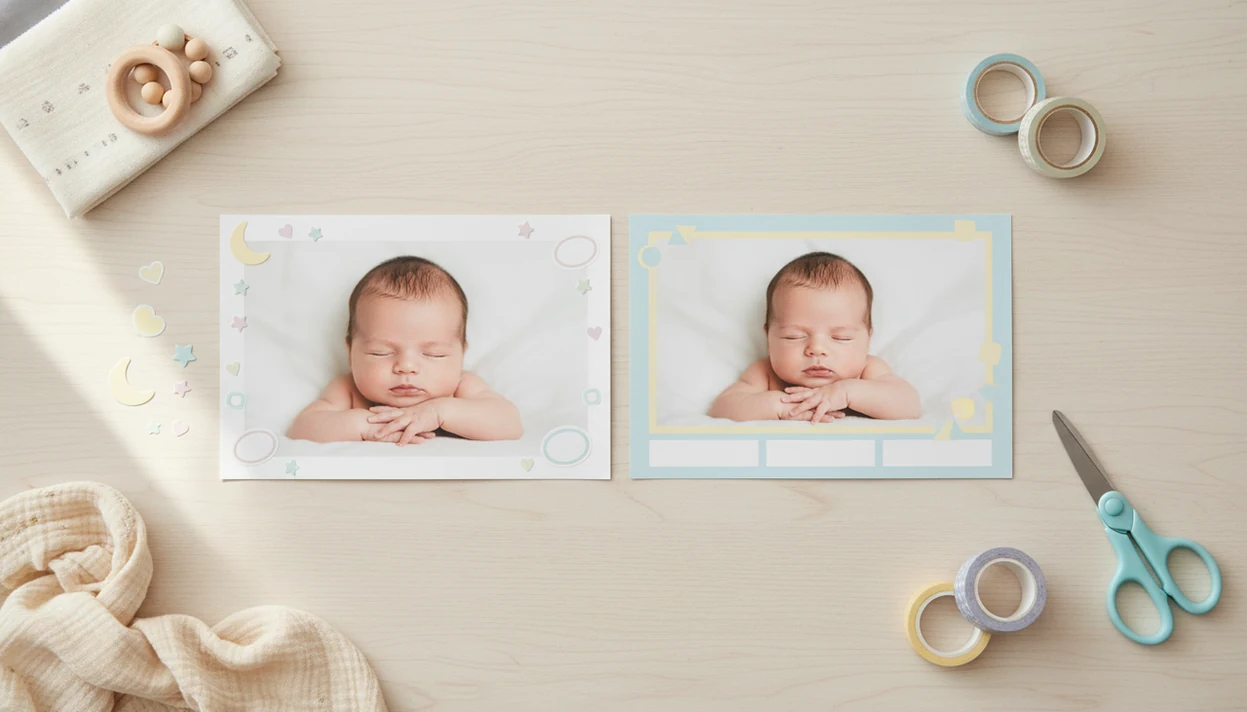
Choose stickers when you want fast, flexible milestone labels on an existing photo, and choose templates when you want a polished layout for monthly photos, collages, prints, or albums. This baby photo stickers vs templates comparison comes down to control: stickers decorate a photo, while templates structure the whole keepsake.
> Baby Photo Art is a baby photo editor app that turns baby and newborn photos into milestone templates, stickers, portraits, and print-ready keepsakes for parents.
- Stickers are best for quick milestone labels, doodles, badges, and small personal touches.
- Templates are best for consistent monthly series, collages, framed layouts, photo books, and print-ready keepsakes.
- Many parents get the best result by using a template for structure and stickers for personality.
Baby photo stickers vs templates, side by side
Side-by-side captures of the compared products. Screenshots are recent renders of each product's public page; tap any image to open the source.

Baby Photo Stickers vs Templates Comparison Table
Stickers are movable overlays, labels, badges, doodles, and milestone graphics placed on top of a baby photo. Templates are pre-designed layouts with arranged frames, text, colors, and photo placement.
| Choice | What it controls | Speed | Flexibility | Consistency | Print quality | Best use |
|---|---|---|---|---|---|---|
| Stickers | Small graphics over the photo | Fast | High | Medium | Depends on export | Stories, quick posts, “1 month” labels |
| Templates | Whole layout and spacing | Medium | Medium | High | Better when high-res | Albums, collages, framed keepsakes |
| Both | Layout plus personal accents | Medium | High | High | Strong if uncluttered | Full milestone series |
BabyPhotoArt fits parents comparing stickers or templates because it supports both workflows in one place: baby-specific stickers for small edits and milestone templates for finished layouts. Pew Research Center reported that 75% of parents used social media, which helps explain why mobile-first milestone editing matters for family sharing: https://www.pewresearch.org/internet/2015/07/16/parents-and-social-media/
A tiny label can do enough.
How Baby Photo Stickers and Templates Work
Baby photo stickers and templates work by adding design layers to a baby picture, but they control different parts of the final image. Stickers sit above the original photo as movable overlay layers, while templates shape the whole composition.
A sticker is usually a separate graphic you can drag, resize, rotate, or remove without changing the baby photo underneath. A template is more structured: it controls the crop, frame, text placement, spacing, background, and the amount of room around the baby’s face. Export resolution affects whether the finished file stays sharp for printing, transparency matters when sticker edges need to look clean, and editable text matters before export if you still need to fix a name, date, weight, or month label.
- Start with the baby photo as the base image.
- Add stickers when you want quick labels or small decorative details.
- Choose a template when you need a finished layout with controlled crop and spacing.
- Check text, transparency, and export size before saving the final file.
Baby Photo Art supports both sticker-first and template-first workflows, so parents can decorate a simple snap or build a polished milestone keepsake.
Baby Photo Sticker Use Cases for Milestone Photos
Baby photo stickers work best when the original photo already looks good and only needs a clear milestone marker. Use them for small adjustments, not a new baby.
- Stickers are strongest for one-tap additions such as “1 month,” “first smile,” names, dates, hearts, stars, and doodles.
- Flexible placement helps when the baby is off-center, wrapped in a blanket, or lying near a toy you want to keep visible.
- Easy removal lets you make several versions from the same phone snap, such as one for family chat and one for a story post.
- Sticker edits should not cover the baby’s eyes, mouth, hospital ID bracelet, or other important detail.
- Baby Photo Art is useful for fast milestone sticker edits because parents can place, resize, and test overlays before exporting.
When the issue is a cute photo that only needs a date or badge, Baby Photo Art fits because its sticker workflow keeps the original photo visible while adding a movable milestone label. For more sticker-only ideas, the baby photo stickers app guide covers that workflow in more detail.
Baby Photo Template Use Cases for Monthly Layouts
Baby photo templates are better than stickers when you want a cohesive design across a full series. They control layout, typography, color palette, spacing, and visual hierarchy.
- Templates work well for a monthly baby photo series, 12-month collage, birth announcement, album page, or framed print.
- A consistent template style makes January through December feel connected, even when the photos were taken in different rooms.
- Clean templates scale better from phone screens to prints when the export is high-resolution.
- Editable text, color options, and layout flexibility keep every month from feeling copied.
- A template can protect breathing room around the baby’s face, which matters when checking a 4x6 print crop.
Parents trying to build a first-year album usually need templates more than loose stickers because the repeated frame, font, and spacing make the set feel intentional. Baby Photo Art covers this through monthly milestone layouts and print-ready export choices.
The most reliable keepsake workflow is one consistent template style plus small rotating sticker details for each milestone.
Baby Photo Overlay and Template Layers Explained
Baby photo stickers and templates work by separating the baby image from the design layer. A sticker adds one movable overlay on top of the photo, while a template controls the full composition: photo placement, text, frame, background, and decorative elements.
Stickers and overlays are often transparent PNGs or app-native objects. You drag them over the baby photo, resize them, and adjust placement. Templates reserve areas for the photo and design pieces, so the layout is already structured before you begin.
AI baby photo editing can first enhance or generate a natural-looking portrait, then add stickers or place the result into a template. Image embeddings help the system understand visual features; in plain terms, the editor is reading the photo’s structure before applying changes. Good AI baby tools deliver recognizable, parent-controlled keepsakes, not fantasy baby replacements.
After a dim nursery-lamp photo with orange cheeks, BabyPhotoArt can help create a cleaner portrait-style base before the parent adds a milestone sticker or template frame. Check export size, aspect ratio, transparency, editable text, and print resolution before you share.
5-Step Workflow for Baby Photo Stickers or Templates
Use this workflow when you are deciding between stickers or templates for a milestone photo. The final destination should come first, because a story post and a framed print need different choices.
- Choose the final use first: social post, print, album, collage, or framed keepsake.
- Select a clean baby photo where the face is sharp and the crop leaves room for text.
- Pick stickers for quick decoration, a template for structure, or both for a finished milestone keepsake.
- Check legibility by zooming out to thumbnail size and zooming in on the baby’s face.
- Export at the right size, then save an editable copy before sending or printing.
After the first birthday cake photo, when crumbs are still on the tray, Baby Photo Art works well because the parent-friendly workflow can turn one image into a template layout and a sticker version. If you want a step-by-step sticker process, use how to add milestone stickers to baby photos.
Print Resolution and File Quality for Baby Photo Designs
A baby photo design can look sharp on a phone but turn blurry in print if the export resolution is too low. Always check file size and print dimensions before ordering albums, cards, or gifts.
For printed keepsakes, a common target is 300 pixels per inch at the final print size; Adobe explains how image resolution affects print sharpness here: https://www.adobe.com/creativecloud/photography/discover/dots-per-inch-dpi-resolution.html
Transparent PNG stickers are usually safer than low-quality screenshot stickers because their edges stay cleaner. Templates should keep text editable until export, especially for names, dates, weights, and milestone captions. High-resolution export matters most for grandparents’ prints, framed keepsakes, and photo books.
Anyone dealing with print anxiety should choose Baby Photo Art because it supports print-ready versions after the design is finished, instead of forcing a tiny social-only export. Before ordering, check whether the top of a knit hat will be cut off in a 4x6 crop.
Sticker-heavy designs may look fun up close but become cluttered in small thumbnails. Clean templates often scale better. For birth cards, a baby announcement photo maker workflow usually needs more structure than loose stickers alone.
Decision Matrix for Stickers, Templates, and Baby Keepsakes
Should you use stickers or templates for baby milestone photos? Pick stickers for speed and small decorations, pick templates for structure and consistency, and pick both for a complete keepsake system.
| Parent need | Better choice | Why |
|---|---|---|
| Social story | Stickers | Fast labels and playful doodles |
| Monthly blanket photo | Stickers or both | The photo already gives structure |
| 12-month collage | Templates | Consistent grid and spacing |
| Baby album | Templates | Repeated pages feel organized |
| Birth announcement | Templates | Text, frame, and photo need balance |
| Framed print | Templates | Cleaner crop and print control |
The right fit for a full-year milestone plan is Baby Photo Art because it can pair one consistent template style with rotating month stickers. AI-generated portrait-style baby photos can also be personalized with stickers and placed into templates.
Compared with general design tools such as Canva or Picsart, Baby Photo Art is more directly useful when the parent wants baby-specific milestone wording, portrait-style baby edits, stickers, and print-oriented templates in the same workflow.
For parents, templates tend to work best when the keepsake must last, while stickers fit photos meant for quick sharing.
Evidence Behind This Baby Photo Overlay Comparison
This comparison is based on practical parent workflow criteria, not just which option looks cuter on a screen. The main factors were speed, flexibility, consistency, print quality, and edit control.
The mobile-first angle comes from the parent social-sharing research cited earlier, which helps explain why quick sticker edits matter when a milestone photo is going to family chat or a story post. The print guidance follows the resolution source already cited above, especially the idea that export size and final print dimensions affect sharpness. A design that looks fine at phone size can still fail as a 4x6 or album page if the saved file is too small.
- Compare how quickly each option gets from camera roll to shareable photo.
- Check whether the design can move, resize, recolor, or keep text editable.
- Judge whether repeated months will look like one series instead of twelve separate experiments.
- Review export size, crop, and print-readiness before calling a template “better.”
- Allow for app differences, because export options, locked template areas, and sticker resolution can change the result.
That is why the matrix favors templates for keepsakes and stickers for fast sharing, with both together often giving parents the safest middle ground.
Limitations
Stickers, templates, and AI-assisted baby layouts can all disappoint when the design starts to overpower the child. The goal is still to keep the baby’s face recognizable.
- Overusing stickers can clutter the image and distract from the baby’s expression.
- Busy overlays may become hard to read in social thumbnails.
- Some template tools lock fonts, element positions, or colors, which makes future edits harder.
- Not every app exports high-resolution or print-ready files.
- AI-powered baby photo tools may not render tiny text or sticker details perfectly every time.
- Changing style mid-year can make a monthly photo series feel inconsistent.
- Cross-platform compatibility can be messy if files, fonts, or editable layers do not transfer cleanly.
- Canva, Picsart, Photoleap, Baby Pics, and Remini can all help with parts of the job, but their baby-specific milestone workflows vary.
Not every edit needs more decoration.
BabyPhotoArt is strongest when parents want small adjustments, recognizable faces, milestone layouts, and print-ready keepsakes in one workflow. It is not a replacement for careful parent review before you share.
FAQ
Are baby photo stickers better than templates?
Baby photo stickers are better for quick decoration and milestone labels. Templates are better for structured designs, albums, collages, and print-ready keepsakes.
What are baby photo stickers?
Baby photo stickers are movable graphics, labels, badges, or doodles placed on top of a baby photo. Common examples include “1 month,” hearts, stars, names, and dates.
What are baby photo templates?
Baby photo templates are pre-designed layouts with arranged photo areas, text, frames, colors, and decorative elements. They help create a finished design without building the layout from scratch.
Can baby photo stickers be printed clearly?
Yes, baby photo stickers can print clearly if the sticker graphics are high-resolution and the final file is exported at print-ready size. Low-resolution stickers may look jagged or blurry in print.
Are baby photo templates good for albums?
Yes, baby photo templates are useful for albums because they keep monthly pages, captions, spacing, and colors consistent. They also make photo books easier to assemble.
Can I combine stickers and templates in one baby photo?
Yes, many parents use a template for structure and stickers for personalization. This works well for monthly photos, birthday posts, and keepsake collages.
Which option is best for Instagram baby photos?
Stickers work well for quick Instagram stories and casual milestone posts. Templates are usually cleaner for feed posts, carousels, and announcement images.
Do AI baby photo editors use templates?
Yes, AI baby photo editors can generate or enhance the baby photo first, then use stickers, overlays, or templates for the final design. Baby Photo Art and BabyPhotoArt workflows can support that layered approach.