
Seasonal Baby Photo Ideas Timeline For Baby’s First Year
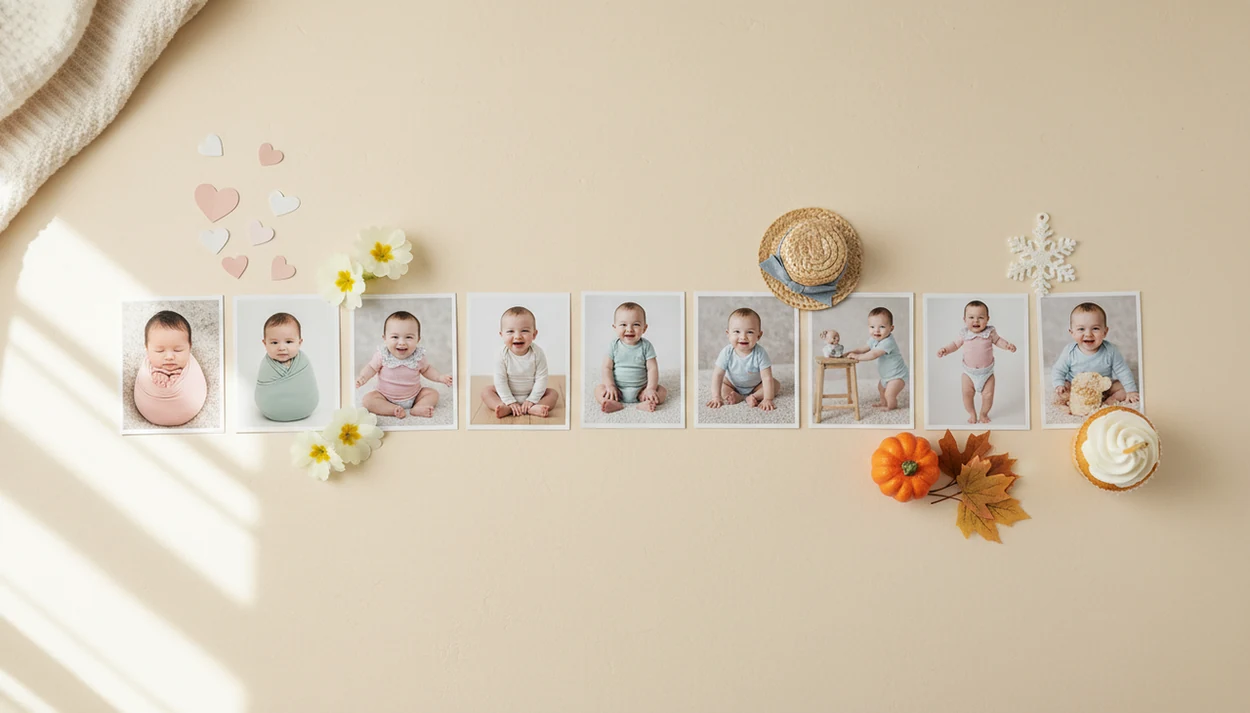
A seasonal baby photo ideas timeline maps your baby’s first year into simple monthly photo moments: newborn details, monthly milestones, holidays, seasonal props, family keepsakes, and first birthday portraits. The easiest plan is to keep one consistent element in every photo, add one seasonal theme each month, and adjust poses around your baby’s age and comfort.
A seasonal baby photo ideas timeline is a month-by-month photo plan that combines baby milestones, holidays, seasonal backdrops, and repeatable keepsake templates across the first year.
- Plan one photo each month from newborn to 12 months, then add nearby holidays or seasonal details.
- Use one consistent prop, blanket, chair, outfit color, or digital milestone template to make the full year look cohesive.
- Keep sessions short, shoot after a nap or feeding, and choose safe poses based on baby’s developmental stage.
At-A-Glance Seasonal Baby Photo Ideas Timeline
Use this timeline as a flexible map, not a fixed calendar. Your baby’s birth month changes which holiday lines up with each age, so swap themes freely.
| Baby age | Seasonal or holiday photo idea |
|---|---|
| Newborn | Winter newborn, soft swaddle, tiny footprints, birth stats |
| 1 month | Valentine hearts, snowflakes, stars, cozy blanket |
| 2 months | Family hands, simple red or pink outfit, early smiles |
| 3 months | Easter, spring flowers, rainbows, tummy-time blanket |
| 4 months | Mother’s Day, garden colors, picnic blanket |
| 5 months | Father’s Day, fruit theme, sunny nursery corner |
| 6 months | Half birthday, beach towel, summer sitter portrait |
| 7 months | Patriotic colors, sunflowers, shaded outdoor portrait |
| 8 months | Back-to-school sibling photo, late-summer blanket |
| 9 months | Pumpkins, apples, Halloween costume, fall leaves |
| 10 months | Thanksgiving, harvest basket, gratitude sign |
| 11 months | Christmas, Hanukkah, snowflakes, New Year countdown |
| 12 months | First birthday, cake smash, one-year portrait, collage |
Cultural, religious, and family-specific holidays belong here too. A tiny handprint beside a photo mat can matter more than matching the month exactly.
Before You Start: Safety, Light, And File Setup
Before you build the first seasonal scene, set up the photo so it is safe, bright, and easy to repeat. A few preflight choices make the monthly timeline calmer and keep private details out of the final image.
- Choose a flat, low surface before you add pumpkins, hearts, flowers, blankets, or any other seasonal prop. The floor or a low blanket setup is usually easier to supervise than a chair, basket, or raised bed.
- Use soft window light from the side or front, then turn off warm bedside lamps if they make the room look orange. Daylight usually gives baby skin a cleaner starting point for prints and templates.
- Clean your phone lens, take one plain backup photo without stickers or props, and save it before you move on to the themed version.
- Remove name bands, addresses, school logos, medical paperwork, and private room details from the frame before sharing or editing.
- Pick one repeatable prop, blanket, outfit color, or milestone template before the first monthly photo so the whole year feels connected.
How A Baby Photo Timeline Works Across Year One
A baby photo timeline works by overlapping four things: age, season, holiday, and what your baby can safely do that month. That is the whole planning system.
Repeatable framing helps because each image can be compared side by side. The same chair, blanket, crop, or template makes growth easier to see in albums, grandparents’ prints, and a first-year wall collage. It also prevents the “every month looks unrelated” problem.
Pew Research Center reports that 90% of U.S. adults own a smartphone (https://www.pewresearch.org/internet/fact-sheet/mobile/), so for many families the phone snap is the realistic starting point. Apps and templates can add dates, stickers, and seasonal graphics after the original photo, without forcing a squirmy baby beside felt numbers every month. Good AI-powered baby and newborn photo generator tools deliver stickers, milestone templates, and portrait-style edits for parents, not a fake child or unsafe fantasy scene.
How To Use A Seasonal Baby Photo Ideas Timeline
Build the plan once, then reuse it every month. For most families, a repeatable baby photo timeline is easier than inventing a new scene each time because it reduces decisions on tired days.
1. Set The Birth-Month Starting Point
- Mark your baby’s birth month, then label months 1 through 12 on a calendar.
- Note any birth announcement photos you still want, especially if the hospital image was dim or busy.
- Add a reminder window, not one exact day.
2. Add Holidays By Month
- Place nearby holidays, family birthdays, trips, religious events, and seasonal changes next to each milestone.
3. Pick One Consistent Photo Element
- Choose one repeated detail, such as a blanket, chair, outfit color, stuffed animal, or digital template.
4. Batch Seasonal Props And Outfits
- Group simple outfits by season so you are not searching for a pumpkin hat at 7 a.m.
5. Save Templates For Prints
- Use Tools like Baby Photo Art or another baby photo editor for stickers, milestone templates, and print-ready keepsakes.
- Save finished photos in one album or folder for comparison, printing, and family sharing.
Newborn To 3-Month Holiday Baby Photos By Month
Early baby photos should stay flat, supported, and short. Newborn to 3-month sessions work best when the theme bends around the baby, not the other way around.
- Newborn photos should focus on swaddles, tiny hands, feet, hospital details, nursery corners, and secure flat setups.
- One-month and two-month photos can use blanket layouts, stable low baskets, hearts, snowflakes, stars, or family hands.
- The CDC lists smiling when you talk to or smile at them as a 2-month social/emotional milestone (https://www.cdc.gov/ncbddd/actearly/milestones/milestones-2mo.html), so 2-month photos may look more expressive than newborn photos.
- Three-month photos can include tummy-time, spring flowers, Easter, rainbows, or a soft seasonal blanket.
- Safe surfaces and short sessions matter more than props, especially when the baby is sleepy or unsettled.
That wrinkled white hospital blanket may stay in the frame. Sometimes it tells the truth of the day better than a cleaner backdrop. If you need a formal birth layout later, a newborn announcement photo app can help preserve the details without reshooting the moment.
4-To-8-Month Seasonal Baby Photo Ideas For Smiles And Sitting
Four to eight months often brings brighter expressions, stronger tummy time, and early sitter portraits. This is the stretch where seasonal baby photos can become more playful, but supervision still matters.
- Four and five months work well for spring blooms, Mother’s Day, Father’s Day, picnic blankets, and fruit themes.
- Six months is a natural point for half-birthday photos, summer scenes, beach towels, ice cream colors, or sitter portraits.
- The CDC's 6-month movement milestones include rolling and leaning on hands to support sitting (https://www.cdc.gov/ncbddd/actearly/milestones/milestones-6mo.html), which makes low, supervised sitter-style setups more realistic for many babies.
- Seven and eight months can use patriotic colors, sunflowers, back-to-school sibling photos, or late-summer outdoor shade.
- AI stickers and milestone templates are safer than crowding the floor with props your baby can grab or mouth.
Use small adjustments, not a new baby. A digital sunflower frame can be calmer than placing real stems beside a baby who has just learned to reach.
9-To-12-Month Baby Photo Timeline For Fall, Holidays, And Birthday
Late first-year photos can include crawling, pulling up, standing support, holidays, and the first birthday. The risk is that the setup gets more ambitious just as the baby gets faster.
- Nine months can use pumpkins, apples, cozy knits, Halloween costumes, or fall leaves on a flat surface.
- Ten months fits Thanksgiving, harvest baskets, family table details, or a small gratitude sign.
- Eleven months works for winter pajamas, Christmas lights kept out of reach, Hanukkah themes, snowflakes, or New Year countdowns.
- Twelve months can include a first birthday cake smash, one-year portrait, standing with support, and family comparison collage.
- CDC 1-year movement milestones include pulling up to stand and walking while holding furniture (https://www.cdc.gov/ncbddd/actearly/milestones/milestones-1yr.html), so standing photos need steady adult support and a low setup.
Avoid elevated props and unstable standing setups. The cake crumbs on the highchair tray are enough. For holiday layouts, a Christmas baby photo template can add seasonal framing without loose lights near curious fingers.
At-Home Seasonal Baby Photo Setup Checklist
A good at-home setup uses simple light, a safe surface, and a repeatable editing workflow. Elaborate props are optional; a clean phone snap can become a meaningful keepsake.
Window light. Place the baby near soft window light, not harsh direct sun. If a bedside lamp leaves an orange cast on newborn cheeks, turn it off and try daylight.
Safe background. Use the floor, a firm mattress with close supervision, or a low blanket setup. Check the crop before you share, especially if the cluttered kitchen counter is behind a baby in a bouncer.
Simple props. Choose a blanket, stuffed animal, letterboard, seasonal outfit, or digital stickers.
Flexible timing. Shoot after feeding or a nap instead of forcing the exact monthly date.
Print workflow. Baby Photo Art is a baby photo editor app that turns baby and newborn photos into milestone templates, stickers, portraits, and print-ready keepsakes for parents. For family albums, a baby photo collage maker can help compare all 12 months together.
Common Seasonal Baby Photo Timeline Mistakes
The biggest mistake is treating the timeline like an appointment your baby must obey. If your baby is tired, sick, teething, or overstimulated, move the photo by a day or a week.
Do not overbuy props for every holiday. Digital templates can create cohesion without storing bins of tiny seasonal items. Also avoid unstable buckets, elevated furniture, loose lights, and restrictive costumes. Cute is not worth a scare.
AI tools can help with stickers, crops, backgrounds, and mild enhancement, but they cannot fully fix severe blur, bad lighting, or a baby facing away. Start with the clearest real photo you have.
Professional studio composites are not the standard for home photos. Your first-year album can include the pacifier clipped to a wrinkled onesie, a crooked letterboard, and one month where everyone was just done. Keep the baby's face recognizable, then let the season support the memory.
Limitations
A seasonal timeline helps with planning, but it cannot control baby mood, room light, or every family event. Safety and comfort should override theme accuracy every time.
- Babies may be sick, fussy, overstimulated, hungry, or off schedule on planned photo days.
- Some months or holidays may need to be skipped, combined, or recreated later.
- Small rooms, weak window light, older phone cameras, and motion blur affect final image quality.
- AI-powered baby photo tools cannot fully repair very poor source photos.
- Not every family celebrates the same holidays, so customize the timeline by culture, faith, climate, and tradition.
- Seasonal props can become unsafe if they are unstable, sharp, loose, or within grabbing distance.
- Print crops vary, so a 4x6 version may cut off the top of a knit hat unless you check it first.
- Privacy matters before you share, especially with hospital room details, name bands, addresses, or other children in the frame.
Tools such as BabyPhotoArt can support the workflow, but they do not replace parent judgment.
FAQ
What is a baby photo timeline?
A baby photo timeline is a month-by-month plan for documenting a baby’s growth, expressions, milestones, and family keepsakes across the first year.
When should monthly baby photos start?
Monthly baby photos can start at newborn, one month, or whenever you can begin consistently. Starting late is fine if you keep the remaining months organized.
Which holidays should I include in baby photos?
Common choices include Valentine’s Day, Easter, Mother’s Day, Father’s Day, summer holidays, Halloween, Thanksgiving, Hanukkah, Christmas, and New Year. Families can also use cultural holidays, religious events, seasons, weather, or family traditions.
Do monthly baby photos need props?
Monthly baby photos do not need props. A repeated blanket, outfit color, chair, or digital milestone template often works better than elaborate setups.
What age do babies start smiling for photos?
Many babies begin reliable social smiling around 6 to 8 weeks, according to an NIH-linked infant emotion review. Before that, newborn photos usually focus more on sleepy details and close-up features.
When can babies sit for milestone photos?
The CDC indicates that many babies can sit without support around 6 months. Every sitter photo still needs close supervision and a soft, low setup.
Are AI baby photo editors safe to use?
AI baby photo editors can be safe when they use a real, age-appropriate baby photo and keep the baby’s face recognizable. Use them for backgrounds, stickers, templates, and gentle enhancement, not identity-changing edits.
How many baby photos are enough for the first year?
One strong monthly photo plus a few holiday, family, and first birthday keepsakes is enough for a first-year album. Consistency matters more than volume.